
360° Relationship Management
360° Relationship Management – How Genesis can Easily Show You Everything about Your Practice There are many choices out there when it comes to choosing your practice software. However, unless it was designed to give you a comprehensive review of EVERYTHING happening in your office in REAL TIME, you are not getting all the information you need to make the best decisions at the particular moment. Relationship management is difficult without all of the information in your software. Genesis was designed with three things in mind: the patient relationship, relationship management, and practice profitability. Without taking all three of these into account, your practice is not going to operate as efficiently as it could, costing you both money and time. “Everything is there right in front of you.” Genesis software provides an ONC-certified scheduling, documentation, and billing solution, a complete chiropractic EHR and practice management system that supports you in every aspect of your practice. You have the ability to automate the vast majority of tasks in ALL aspects of your practice, with emphasis on the management of patient relationships, the revenue cycle, as well as compliance and office management. Dr. Dan Volosin, DC of Advanced Health and Wellness, says that Genesis offers amazing detail and is user friendly. According to Dr. Volosin, the best thing about using Genesis Chiropractic Software in his office is that “Everything is there right in front of you.” He goes on to say, “There are so many features to it that, in my opinion, make it the best choice for a Chiropractic office. I have used four other programs in the last 10 years, and this one is definitely the most thorough one available. It seems like they have everything I have ever wanted in an office program and then some!” Justin James, DC of James Family Chiropractic, agrees. He says, “I’ve been using Genesis for almost 10 years now, and I’ve never thought about using anything else. It just takes care of everything all in one system. If I opened another practice and had to start all over, I would not consider anything else.” The fact is, Genesis Chiropractic software is the complete solution for all of your practice needs. It was conceived and designed to give DCs everything they need to run their office both effectively and efficiently. No other software product out there gives DCs more control and more feedback on what is happening in their practice Learn how to make Genesis Chiropractic Software your solution in your practice. Contact our sales team today and get started seeing the results in your office that over 9,000 clients are already experiencing.
Care Plans Improve Patient Care and Boost Revenue
Improve Patient Care and Boost Revenue by Automating Your Patient Care Plans Using a Care Plan for your patient is a critical tool that you need to ensure the success of your Chiropractic practice. They allow you to track the financial commitments your patients have made to your office, their adherence to their scheduled visits and even provide you with timely alerts to ensure you’re able to handle issues as they come up. The reason care plans are so vital is that when a patient walks through your door and you want to help that person achieve and realize their health goals, that patient will have to commit to more than one visit to make that happen. One visit is never going to solve the problem. A care plan makes it clear to patients how many visits are planned, how they’re going to be charged, how they’ll make payments and finally, how they’re going to schedule those visits. And, they allow you to know when a patient is off track. Genesis Chiropractic Software automates your patient care plans to ensure all of these functions are performed optimally, with very little time commitment involved to set them up. You simply create a new plan, set up the visit counts and schedule. The care plan will bill all insurance visits first, then all cash followed by any visits that are free. Setting up care plans with Genesis allows you to have a more clear financial conversation with your patient. Setting up a care plan with Genesis allows you to have a more clear financial conversation with your patient. They know exactly how much they will be billed and when. They understand how many visits they will need to make and when. There is no ambiguity. And, once the visits are scheduled, the patients can automatically receive a reminder call or text message reminder, making it less likely they will forget their appointments. With Genesis, you can even automatically set a re-exam schedule. For example, every 10th visit the patient will have a re-exam to determine whether their care plan needs to be extended. You can also set alerts to pop up, for example a “Medicare 12 visit re-exam alert.” This ensures every patient is receiving optimal care and no required exams are missed. Genesis even offers pop-ups as your patients check in that can count down the number of visits they have remaining on their care plan, the number of visits covered by insurance remaining, etc. The options are endless. You also benefit from Genesis and patient care plan automation through better financial forecasting. With Genesis you can track your active care plans to determine how many patient visits you can expect for the next month and the financial implications of those visits to more accurately predict your income. And, that’s not all. Once a patient has a care plan established, the system alerts you immediately should they miss a scheduled visit. This means that you can take steps to get the patient back on track and prevent them from falling out of care. And as you know, retention boosts revenue. It’s clear that automating your patient care plans with Genesis Chiropractic Software can greatly contribute to both the care you provide your patients and the financial success of your practice. Take advantage of the features offered by Genesis and create your dream practice today.
Quantifying the Patient Experience
See how well a pro-active chiropractic practice can operate with a consistent Patient Experience. As chiropractors, we know our main goal is to continuously achieve optimal health for our patients. The core principles of this goal include imparting the philosophy behind our profession, promoting a healthy lifestyle, and giving our patients the confidence they need to believe in your services, all for the sole purpose of increasing their well-being. The question is… how can we do that consistently, without fail, every time a patient comes in to your office? How can you optimize their experience? How can you know for certain that level of achievement is assured? Practices that operate on the “management-by-fire” method, are always harping at a stressed out staff, and are never going to achieve the success they could. It governs on a reactive process, looking for the problem to correct after the fact. It doesn’t matter if it involves a patient no-show, an expired care plan, billing issues, or long waits; the outcome rarely changes because the process to prevent it is not part of the equation before the patient enters the building. Deep down, you know this is not the way to conduct your business and this is certainly NOT how high level operations work. Yet, these are all factors that can be dealt with BEFORE they become a problem. Every single one of the problems listed above have to do with the patient experience. When you realize that it’s your responsibility to prevent them from becoming negative factors in your practice AND you have a solution to them BEFORE they become problems, then you have a pro-active practice… One that can offer a unique experience for your patients and create the successful, highly efficient practice you have always wanted. Genesis Chiropractic Software takes these seemingly minor tasks, along with numerous fully-customizable operations, (all of which are involved in the day to day management of your office), and it gives you the ability to quantify your patient’s experience. It offers the patient an optimal and seamless experience from the time they enter your facility to the time they walk out the door. You have instant feedback on where each patient is in their treatment plan, what billing concerns they may have, and any other mission critical factors that might keep them from having the best experience during their visit. The team at Genesis Chiropractic Software is here to help you see how well a pro-active chiropractic practice can operate with a consistent patient experience. By offering you a unique, fully customizable software solution geared to any size practice, you can offer your patients an optimal experience every time they visit you, increasing patient retention rates and continuing to offer them an opportunity to achieve optimal health.
Patient Balances
How to do Patient balances, payments, and statements. Patient balances on their account with your Practice can be easy to use within the Genesis Chiropractic Software. You need an easy way to enter patient co-payments, insurance payments and then provide various people with a statement when they ask for it. This functionality is inside of the Genesis Patient Accounts and it will make your work life much easier. Your Patient Accounts must be accurate because you don’t want your patients or insurance companies questioning what you provide to them. You need an easy way to print out statements in case you need to send them to lawyers, patients and insurance companies. Patient Balances must be kept up to date and Genesis Chiropractic Software has the accuracy built-in. All you have to do is to enter the information on the right account. Watch this Free Webinar to learn more from Jason Barnes, and to see exactly how it works. Enter your information and watch it immediately. Read the transcript: My name is Jason Barnes. I’m the Chief Operations Officer here at Genesis Chiropractic Software. And I am looking forward to today’s topic. Not the most complicated topic of the day but one in the past where we’ve had some of the highest rates of actual participant interaction. I guess today we’re going to talk about how to enter in patient payments and then furthermore we’re gonna take it down the line with, how are we gonna get the interpretation of, what was paid for, what wasn’t paid for, what’s patient responsibility and how do we get statements either to patients or how do we get statements to attorneys. Sometimes insurance companies want to see, “Hey, I need a complete breakdown.” So we’re gonna show you some of the tools available for doing all of that. So, as we’re going, I always, always recommend that you ask questions. I will be monitoring the questions throughout the webinar. So, feel free to chat them in and I will take them…I’ve never not gotten to all of them so feel free to chat them in and I’ll make sure that they’re tackled. And looking at this, it’s 2:04, let’s get underway. So we always like to start in the actual schedule. So, when we’re doing this, we want to make sure that two things are happening, right? When we click on a patient, there’s a couple of ways of actually getting to the place where you’re gonna enter patient payments. So, we’re not going to start with going through all of those but coming to the More button, gives you a lot of options, alright? So, the first one we’re going to talk about is not necessarily getting to the patient account. Because you could find yourself in one of two scenarios, either the patient is paying as they go or they’re paying on a recurring or a prepayment. So if they’re paying on a recurring basis, meaning, they’ve got $300 coming in via a credit card, that’s one way. They could be paying on recurring where they’re coming in and putting a check in, or running their card for $300 in a month. I want to make sure we cover all the scenarios. But right now, we’re just going to cover the scenario which is the patient is paying as they’re going. So, patients walking through the door. We are integrated with a number of credit card companies and we noticed, and we’ve run all the reports and statistics and this will not surprise you, that most of our clients who are private, pay with credit cards. If you’re using an integrated merchant service company, like a FORTIS or a ClearGage, you can come down and actually click on the FORTIS Processing, it will bring you to the patient that you’re on and you can actually run a card. So if you wanted to, you can come down here and you can run a sale, run a refund. And so if the cards are already on there, you can come in, you can post $50, you know, for a regular adjustment, let’s just say, and that’s that. You’re going to process the transaction, it brings up a receipt. This automatically posts on the patient account so this is one of the ideal scenarios that we talk about. The largest percentage of the patient payments that are going to be processed are going to be done through credit card. So, if you’re talking about that we really do recommend looking at some of the solutions that we already have integrated. So we’re gonna close out of this, and we’ll get back. If you were not using an integrated method, you would still go to the More button and we would take you into the Patient Transactions tab, it’s going to bring up a pop-up, which I’m going to not maximize, rather I’m going to take the opportunity here to focus in on one specific area here. This specific area is right here at the bottom, where you have a date of February 21st, 2017. You can change that date, there are very few situations which I would recommend that you change that date but it’s always possible, you can do that. However, this next date is a service date and we’re going to talk about that in a second, all right. But if $50 was what you wanted to put in, you would choose a credit card, if you wanted to choose MasterCard, Visa, etc, you can go to the next step there and you would simply put Add Payment. That payment would automatically be added to this Transaction tab as the next item in here. However, you’ll notice that we didn’t put a date associated with the payment, that is a big deal, that makes a big difference in the Genesis system. Because the way we’re talking about not only posting patient payments but how we’re going to allocate the money that
The Patient Experience Pioneer
What Sets Genesis Chiropractic Software Apart? The Patient Experience. Yes, choosing the right software to manage your Chiropractic practice is a vital step in ensuring your office runs more easily and efficiently, but it’s even more than that. Here at Genesis Chiropractic Software, it’s also about the patient experience. You’ve probably heard more talk these days about patient engagement but the truth is, at Genesis, we’ve been working on the patient experience and patient engagement from the very beginning. Genesis is the pioneer in the field. In fact, our software is designed specifically to ensure that the patient experience is not just good, but the best possible in each and every patient encounter. Genesis is more than an electronic health record. It’s far more than a software to improve your billing. Genesis Chiropractic software was built from the ground up to model the software used by Fortune 500 companies to enhance their customer experience. You see, these companies have the data, the money, and the technology to analyze each and every piece of the customer experience. They break it down to its components and discover what works and what doesn’t so that good results are not just understood, they are repeatable. Prior to Genesis, the type of software that these multi-billion dollar companies use was not available to Chiropractic practices. After all, what Chiropractic office has the type of resources available to companies like Amazon or the Ritz-Carlton? But, we at Genesis had a mission… a mission to bring this Fortune 500 technology to Chiropractors… a mission to apply this technology to the patient experience and optimize it in the same way the big boys were using to optimize the customer experience. The result was Genesis Chiropractic Software. Unlike other software that just functions as an EHR or billing system, Genesis goes a step further – a big step further. Genesis uses the technology that companies like Amazon depend on and breaks down every task that must be completed in your office to ensure that every single patient receives the optimal patient experience. From greeting a patient to scheduling appointments, making follow-up calls, performing re-exams, and more, the system assigns each task to the person in the practice best equipped to handle it. Even better, with one glance, it allows you to see how many necessary tasks have been completed and even more importantly, how many have not. You know in real-time what must be done to ensure your patients receive the best care possible. And, you can see if there are any “mission critical” points to handle to make sure patients don’t drop out of care. Genesis Chiropractic Software’s focus on the patient experience sets us apart. Don’t settle for just another EHR. Put our Fortune 500 technology to work in your practice, gain visibility into your practice’s success, and enhance your patients’ experience with Genesis today.
Patient Portal
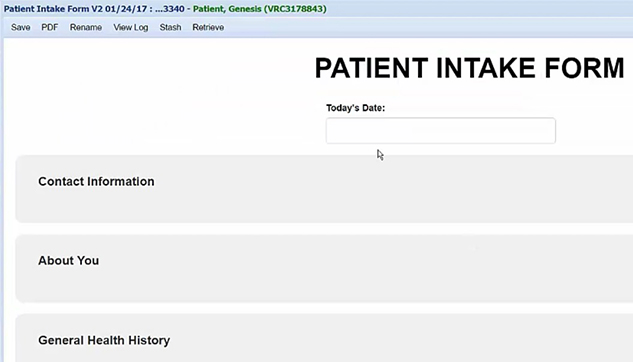
See the Patient Portal within Genesis Chiropractic Software A new Patient Portal has been created within Genesis Chiropractic Software. Your patients will be able to fill out their intake forms online at home or online at a kiosk at your office. You’ll also be able to exchange secure messages with them within the Genesis secure software system. This Patient Portal is a much better way to do it versus PDF forms that your patients print out and then fill out. The paper forms still have to be typed into patient demographic forms in the Genesis Chiropractic software, so filling out the paper forms ahead of time saves the patient time but not your staff. A better way to do this is to have your patient type their demographic information directly into the Genesis Patient Portal forms. This will save a lot of time for your staff and it will keep them from making typo mistakes while rushing to get it done. Watch this Free Webinar to find out more from Jason Barnes, and to see exactly how it works. Enter your information and watch it immediately below. Read the transcript: All right, we seem to be matching the number of web and audio participants which is typically the sign to get started. So, if anyone does have any questions, feel free to chat me. It will actually tell me during the presentation whether or not somebody has a question at an appropriate moment for a pause. We’ll pause, we’ll take the question, and make sure you’re able to get the information that you need today. As always, at the end we’ll stop and open up for questioning about this topic, but I usually like to stick around for a couple minutes and people can pretty much ask any question they want about any topic that, if I can answer, I’ll be happy to. Introducing myself. My name is Jason Barnes. I’m the Chief Operations Officer here at Genesis Chiropractic Software. Every couple of weeks, we get on here and we do a presentation about a new feature or some feature that we had around for a while that maybe we made it a tweak to. But oftentimes, it’s about helping you solve a problem in your practice or that could be affecting your practice so that, you know, when it does happen to you, you know how to take advantage of something that we already offer. And today, we’re actually going to keep it pretty simple, introducing a patient portal. Now, this technology that we’ve been rolling out over the last couple of months here is finally ready to be used, and what we’re excited about today is how to help you do basically two things, how to help patients fill out documentation at home and how to continue to stay qualified for Meaningful Use should you need to. And in addition to that, there’s some information that patients can utilize within the patient portal, send messages, you can send messages back to them so that you can stay in contact with them outside of text alerts, etc. So today we’re actually going to start off with going to the link that I had set up in my email, and we’re gonna work backwards for today. So, working backwards for today, we’re gonna start off with the email that sent. We’re gonna click on that, and we’re gonna show you what the patient is seeing first and foremost of all. Now, there’s two different types of links that you can send here, and we’re gonna show both of them. So, for those practices who want to qualify for Meaningful Use and for those practices who have made a decision that that’s not for them, Meaningful Use being the incentive program that started out for the Centers for Medicaid and Medicare. We are in Stage Three or Phase Three of that right now, and so we’re gonna go to that. And we’re also gonna show you what this looks like for patients who are not doing that. So we’re gonna give you both vantage points today. So, giving you an idea of what it is that your patients are going to be able to see. If you’re sending this to a patient for the first time, there’s not gonna be much of a summary. But if you look at this from the patient’s point of view, how does that patient become a patient, whether at their screening, whether or not they heard an advertisement, or if they walked into your office? How do you get a patient to give you their information and fill out the information that you need to get? It’s going to be through their email that you’re going to get them a link to the Genesis system that will give them access to your particular portal, meaning their portal within the Genesis system. So they’re first gonna get a summary. That summary is gonna have a table of contents which has to do with a few different things…I’m gonna blow this up here, what kind of problems that they had, what kind of medications alerts, what sort of immunizations they’ve had, if any, which are taken from histories. This next one is an XML file. That is a Center for Medicaid and Medicare requirement that you have to have an XML file, should this patient need to take a file such as this and go to Medicare or Medicaid’s website and actually upload it. But more importantly, if you are hooked up with one of our software platforms such as 3RX or MyRxx which are some of those platforms that we offer…this is a just a sample of them. We offer more on this, that offer at-home exercises, ways to remind patients of what their stretches, or their homework is. We actually have those in the patient portal, as well, integrated. Obviously, you wouldn’t see more than one in your patient portal, should you do that. But
Increase Patient Retention with ZingIt Solutions

ZingIt is Integrated into Genesis Chiropractic Software As a Chiropractor you know that if you don’t keep in touch with your patients and communicate with them, then they will appreciate the value of your chiropractic care less and less. They need to be constantly reminded of the value of chiropractic until they become raving fans and they refer everyone they know to your practice. This is a great idea but how do you keep in contact with your patients? People don’t answer their phones very much nowadays, but they’ll look at a text message instantly. Are you texting your patients? ZingIt has an online system that makes it easy to communicate with your patients. Let them send your messages to your patients and then you can concentrate on giving them the best patient care. These tools have been integrated into your patient accounts, so please put them to good use. Use ZingIt to reduce No Shows, reduce No Future Appointments, send appointment reminders, send birthday messages and inform your patients of something special happening at your office. Why? Because happy patients and happy staff makes a practice owner very happy. Watch this Free Webinar to find out more from Jason Barnes, and to see exactly how it works. Enter your information and watch it immediately below. Read the transcript: Jason: My name’s Jason, I’m the chief operations officer here at Genesis Chiropractic software and I’ve been working with the company for seven years now, and Prior to this, technology was the space that I worked in. I don’t come from a background of healthcare administration or healthcare consulting or advising. And so, from my perspective, scaling technology was always a part of how I got up and spent every day of my professional life. And to that end, I started working with a company that started supporting chiropractors and the very unique needs of the chiropractic world. Now, I’m not suggesting that other specialties, other types of clinicians don’t have really unique needs but focusing on these it’s been fun and understanding the one specific difference that I see with chiropractic is that it needs to be followed up on so vehemently. You’ve got to work so diligently to help chiropractic patients realize that they need to commit in order to get the full benefit of the chiropractic care that’s being offered. And to that end, we are going to talk about how, just our software solution alone, we know is inadequate to help. And today we wanna tell the story of how it is we partner with others and why we partner with others to do that. Joining me today is Steve Weber from Zingit. Now, Steve has been one of those partners, and certainly not the only one, but one that we really have enjoyed working with. And that doesn’t just go for you, Steve, that goes for the entire organization, folks over there that have helped us take a platform that’s great in a lot of ways that we think, and we’re grateful that a lot of our clients think of it, and create something that’s better for clients and for chiropractic and for those practices that know without great technology, they can’t leverage a fantastic team and an awesome service to create an experience that can change communities. So, today, we are focusing on how those relationships take off and how a platform like Genesis is used to actually help all of us accomplish that. So, Steve, thank you for joining us today and we’ll get underway. Steve: Well, I, certainly, appreciate being here. It has been a pleasure as well working with the team at Genesis. And having spoken to loads of offices on a daily basis I can tell you that from a user standpoint, clients of Genesis speak very, very highly of the team and how the software works. So, we’re happy to be associated with Genesis and more importantly, just from my standpoint, I love working with chiropractors because they’re out there to really help patients and we want to help them do that. And there are some significant challenges that chiropractic offices and their staff face every day. So, what I wanted to do is, first of all, share a little bit about myself. Like you Jason, I’ve been here six, almost seven years now. And before that I was in the healthcare space but mainly not chiropractic, but more selling to hospitals and medical offices for many years. So, when I joined here we really wanted to make a difference, and that’s what we’re looking to do with the offices that we work with. Partner with solutions that are industry-leading like the Genesis Chiropractic Platform, their software, but then also provide a solution that everybody faces every day which is patients just don’t answer the phone anymore. So, you can call until you’re blue in the face but they just don’t answer the phone. So, when we first started working with Genesis, Jason that was, I wanna say almost four years ago now. Jason: Yeah. We had the debate the last call we’re on it. I think four years is what it looked like from our first client comming on board. Steve: Yeah. Very beginning of 2013, so in a month it will be four years. So I don’t know, do you want to flip over to my presentation or what are they seeing on the screen? Jason: Yeah, right now they’re seeing what I’m sharing which is just a couple of questions and so I’ll finish a little bit more of the set up Steve, and then we’ll flip over to you, probably take about two minutes here. So, for four years we’ve been working together but I wanna tell the story of prior to getting to actually how we got to that point. I wanna tell the story more of how we got to saying, “Yes,” to a Steve Webber when we got on the phone. So I’ll lead up
Patient Retention Tools Really Work

Genesis Patient Retention Tools Really Work As a Chiropractor you know that patient retention is the life blood of your practice. It’s much easier to keep the patients that you have than it is to attract completely new patients to your practice, as well as being less expensive to market to them. How do you retain patients in your practice? What do you do about No Shows and No Future Appointments? Do you have a plan and a person to take care of that for you? Do you know for certain if they actually follow-up or not? With Genesis Chiropractic Software your staff will be automatically notified to follow-up with alerts, notifications and tasks to remind them to get back with every No Show and No Future Appointment. This ensures that no patient is forgotten about and none of them will fall through the cracks. Watch this Free Webinar to find out more from Jason Barnes, and to see exactly how it works. Enter your information and watch it immediately below. Read the transcript: So welcome, my name is Jason Barnes, and I’m the chief operations officer here at the Genesis Chiropractic Software. I’m really glad that everyone joined this today. And as we’re talking about patient retention, this is gonna be more of a session where we go over the strategies and the best practices that we recommend. Now, I’m looking forward to hearing any feedback, any suggestions that anybody on this call has, and we’ll open it up at the end for questions and answers, and I’ll check periodically throughout the presentation. Feel free to actually type in any of your questions, I’d be happy answer them. I know as we’ve had webinars recently here, some of the best interactions that I’ve had have been over the last couple of sessions, where I know we can learn so much from you guys. And we build a system so that it will work for so many practices, but I know there are lots of scenarios where the things that we recommend sometimes don’t work, so we’d love to hear about those and see what we can do to solve those issues. But I’m actually gonna start on a more personal note today. So to do that, showing a picture, this is my family. I like ’em a lot. They’re….been married now for nearly 16 years and we got 3 beautiful kids. And the reason I use this particular slide is they are the most important thing to me. I’ve been supporting chiropractors in offices now for seven years. And my personal story is that I was not very good at it for the first three because I didn’t realize that the office managers, the front desk people, and most of all those practice owners, feel the same way about their patients as I do about my family. So the moment that I realized that that connection existed, is when I started becoming more effective at helping practices actually make that connection themselves. So I don’t let my 13-year-old daughter go out without knowing where she’s going and having the ability to communicate with her when she isn’t home on time, or needs to be picked up from gymnastics, or school, whatever it is. And so I’d like to actually apply that same logic to your patients. I understand that you care about them and you wanna track them. But we’re gonna go over the strategy that we’re recommending to actually do this. And if you care about them the way I care about my family, I think we’re gonna have a great presentation today. So getting started, what are your family goals? Number one, you wanna grow the family. [inaudible 00:02:46] may or may not be not be done, but I know all of you wanna keep growing your practices, and that I’m sure of. So as you wanna grow your family, you wanna track the family that you’ve already got. You cannot install GPS trackers on your patient, you can’t do it. So your goal is to get more, keep the ones that you have by tracking ’em, and then finally you need to communicate. You need to communicate with those patients, there’s no way around that. So today we’re gonna talk about how are we gonna do this, all right? Because the family matters, you have to have a practice that has team clarity. What am I supposed to do? So we wanna talk about how to achieve clarity from practice owner, to office manager, to front desk, to CA, what is it that you want each person to do to help gain new patients and keep the ones that you have? So retention is going to be the main focus for today’s presentation. When a patient falls into one of those gaps, right, how do we know who fell out of touch, how do we identify those scenarios? Even if you put in the best preventative measures in the world, there’s always gonna be a patient no-show, there always gonna be patient who somehow can’t schedule their future appointment right now and they want you to get in touch with them in the future. So how do we identify those gaps? And so because the family matters, we have to be able to answer these questions, what’s your team supposed to do and how are you going to identify those people that need attention, right? So what’s our secret? First we have to define the problem, right? So that’s what we’re talking about with giving great direction to your team, making sure they know exactly what to do, because we’ve actually defined what’s gonna happen. Then we have to be able to measure it. How often is it happening? How often is there are patient choose leaving without a future appointment, or no-shows, or somebody who is transitioning from the end of a care plan into maintenance care, or and an exacerbation took place and they have
Patient Retention Success Stories
We’ve talked a lot about how putting Genesis Chiropractic Software to work in your office can help you create a better patient experience, increase revenue, improve patient retention, and just generally make your life easier. Today, I wanted to take the chance to introduce you to two of our real-world success stories, doctors just like you who leveraged the power of Genesis and have seen the incredible results first-hand. The first doctor I’d like to introduce to you is Dr. Chris Zaino. Dr. Zaino’s practice sees 2,600 patient visits each week. A high-volume practice like this one is an amazing opportunity to change the lives of so many patients through the power of Chiropractic, but also provides many opportunities for patients to fall through the cracks. That’s why Dr. Zaino is so happy with the access to patient care plans that Genesis provides. Dr. Zaino says that the Genesis heat index that shows him and his staff immediately through a color-coded system whether a patient is missing visits gives him the opportunity to take action right away and get patients back on track with their care plans. In the Genesis system, when a patient is compliant with their care plan, the screen you see is white. If they miss a visit, it turns pink to warn you that they need to get back on track. If more visits are missed, the screen will be red. According to Dr. Zaino, that red screen is great for reminding him to take the time to connect with his patient and explain to them the importance of their care because for every visit they miss, they are “going backward”. Dr. Zaino says, “It’s all about connecting and connecting can be done in a split second if you’re doing it right.” Another doctor, who has harnessed the power of Genesis in his office is Dr. Jason Haas. Dr. Haas loves the fact that the Genesis system is set-up to provide easy interface with the Posture Screen software. He uses the Posture Screen tools in his office to educate his patients on what their posture looks like, should look like, and to provide follow-up data on changes in their posture as a result of their compliance with their care plan. With Genesis and Posture Screen, Dr. Haas’ patients can see immediately what their posture looked like prior to care and how it has improved. Dr. Haas says, “Genesis makes it easy to use with their interface. This gives us an incredible practice certainty we couldn’t get with other practice software.” The successes that Dr. Zaino and Dr. Haas have had with Genesis in their practices is just a small sampling of the incredible stories we have received from doctors who have implemented the software in their Chiropractic offices. From increasing patient compliance to simply making running their offices more efficient and intuitive Genesis has provided countless benefits to our doctors.
Patient Accounting
How does your Chiropractic Practice handle Patient Accounting? As a Chiropractor you know that accurate patient accounting is a very important part of creating a great patient experience in your office. For your office, how do you determine what your patient’s owe? When do they owe it? Why don’t they owe it yet? How do you determine where your dollars are outstanding? What would your patients think of your practice if you couldn’t provide this information to them within moments as they wait in front of you? Genesis Chiropractic Software has thought of these questions and the tools you need are just a few clicks away. Watch this Free 30 minute Webinar to find out more from Jason Barnes and to see exactly how it works. Learn how to use this tool to improve your patient accounting, your patient statements and ultimately your patient satisfaction. Enter your information and watch it immediately below. Read the transcript: Good afternoon and welcome, everybody. Jason Barnes with Genesis Chiropractic Software. It’s about two minutes past the hour, and we’re gonna get started in just a moment here. I’d like to thank everyone for joining us. Keep in mind that everyone is muted for this presentation so if you do have a question, I ask that you type it in so that I’ll get a notification and we’ll answer it as we are going. Feel free to type those in at any given point, and we’ll make sure to answer them as quickly as we can. So we’re just gonna give it another moment here, and we’ll get started. All right, guys, it’s four minutes past the hour. We’re gonna get going. Today, we are actually speaking about patient accounting. And I wanna make sure we go through a few things here when it comes to patient accounting and trying to understand exactly how your patients can understand a few things. Number one, what it is that they owe, number two, when they owe it, and number three, why don’t they owe it yet. And if that question at the end of this doesn’t make much sense, I’ll hopefully put the pieces together today while we’re talking. If there are other questions that you want answered throughout any portion of this presentation, feel free to type them in, and we’ll do our best to answer them today. Right now, though, we’re gonna get started with actually a brief overview of some reporting for the entire practice before we get into exactly what it is that’s outstanding for an individual patient. So patient accounting, I’m gonna blow up this for the presentation so that you guys can see it a little bit more easily. But first, I wanted to go into a few reports. First, we go to reports, our billing analytics, and we can go to what’s called our accounts receivable or AR breakdown. When we bring up this particular report, it’s going to give us the breakdown of where our dollars are outstanding. Our total accounts receivable balance for the first one is representing our insurance accounts receivable, our patient balance, how much money is sitting there in claims that need to be addressed on our workbench, special projects. Collections is a status so if a line item on a patient account is in collections status, that means that that particular balance has been sent or is designated for a collection agency. And then added all those up in the last column is the total. That AR breakdown allows you to see, and you can drill into that number and see that there are 695 claims for this particular example that actually make up that balance of $78,000. So you can sort this, you can filter by it, you can do greater than or less than. So if you wanna look at amounts greater or less than, you know, let’s just say $100, you’re able to do that. So any amount less than $100 or any amount greater than $100, you’re able to do that within these fields at the top of this pop-up report for your accounts receivable breakdown. Why do you wanna know these things? Keeping a finger on the pulse of how much, in a way, a patient balance is is important. There can be thresholds you can set for yourself of what is or isn’t acceptable. And today, we’re going to hint at the fact that we really like to see policies and procedures put in place. If you go over here to your search patient feature, simply click on search and patient, that gives you a number of options as well. So if I don’t look at anything else and I just simply click on a search which is going to search for all of them, it’s gonna give you all open patients and their patient balance here in the right hand corner. If I wanna search for people that have been seen in the last 120 days with a balance only, I can then search for those patients as well, and it goes from 2,200 in our demonstration account down to 174 patients. And you can actually see that these are sorted into the balances which are the highest on the right-hand side. And I wanna make sure that you guys understand that these tools are meant for you to be able to identify those patients, but in no way, shape, or form is this the best way or the best practice that Genesis is going to recommend to handle these balances. And so we’re gonna get into this process a little more as we’re moving forward here. But to start out, to recap the big picture, you wanna be able to look at your accounts receivable breakdown to see how much in the way of patient balances are actually existing as a total for your practice. And keep in mind that this is regardless of the data service. This can be 10 years old, 2 years old, or 2
