
Genesis Journey of Lucro: Cultivating Profitability and Beyond
In the realm of business, there exists a quest for excellence, a relentless pursuit of growth and success. Within this narrative lies the story of Lucro, a venture birthed from the aspirations of individuals determined to unravel the secrets of prosperity. Dr. Josiah Fitzsimmons and Adam Rundle, the visionaries behind Lucro, embarked on a journey fueled by passion, knowledge, and an unwavering commitment to transform dreams into reality. The Genesis of Lucro: Dr. Josiah Fitzsimmons, shaped by a childhood of competitiveness and a hunger for success, found himself at a crossroads upon entering chiropractic school. Faced with the stark realization of the absence of business education in his curriculum, he embarked on a quest to decipher the nuances of running a successful practice. Determined to excel, he immersed himself in the world of chiropractic clinics, learning invaluable lessons from over 50 different establishments. Armed with insights gleaned from real-world experiences, Dr. Josiah set out to establish his own practice, laying the foundation for what would soon become a remarkable success story. Within a mere four months of its inception, Dr. Josiah’s practice soared, hosting over 500 events and setting the stage for a meteoric rise in revenue. From surpassing the million-dollar mark in its inaugural year to achieving a staggering $5.5 million in revenue by its fourth year, the trajectory of success was unmistakable. However, amidst the euphoria of triumph, Dr. Josiah found himself pondering a crucial question: How does one sustain and elevate success to unprecedented heights? Enter Lucro: It was amidst this quest for continuous growth that Dr. Josiah crossed paths with Adam Rundle, a seasoned consultant and fractional CFO. Recognizing the pivotal role of financial acumen in scaling businesses, Dr. Josiah enlisted Adam’s expertise to navigate the complexities of fiscal management. Together, they embarked on a mission to revolutionize the chiropractic industry, laying the groundwork for Lucro. The Perfect P&L: Central to Lucro’s philosophy is the concept of the Perfect P&L—a strategic framework meticulously crafted by Adam Rundle. Drawing inspiration from diverse disciplines, including the game of chess, Adam sought to demystify the realm of financial analysis. Just as a chess player strategically positions pieces on the board to maximize their impact, businesses must discern the optimal allocation of resources to achieve profitability. Through rigorous analysis and a deep understanding of financial principles, Adam devised a blueprint for success—a roadmap that transcends industries and empowers businesses to thrive. Empowering Growth Through Data: At the heart of Lucro lies a commitment to empowering businesses with actionable insights derived from comprehensive data analysis. By leveraging the power of monthly financial reports, Lucro equips entrepreneurs with the tools needed to make informed decisions and drive growth. Gone are the days of uncertainty and conjecture—Lucro provides clarity amidst complexity, guiding businesses towards their full potential. Conclusion: In the annals of entrepreneurship, Lucro stands as a beacon of innovation—a testament to the transformative power of collaboration, expertise, and unwavering determination. As Dr. Josiah Fitzsimmons and Adam Rundle continue to chart new frontiers in the realm of business, their journey serves as an inspiration to aspiring entrepreneurs worldwide. With Lucro leading the way, the pursuit of profitability knows no bounds, heralding a future where success is not merely a destination but a continuous journey of evolution and excellence.
Revolutionizing Documentation in Integrated Healthcare with FlexNote Technology
Diving into a groundbreaking development that’s set to transform the way healthcare practitioners, especially in integrated clinics, document patient care – Dr. Roy, a board-certified surgeon turned tech enthusiast, is here to unveil the FlexNote technology, an innovative documentation platform designed to cater to the diverse needs of allopathic medical providers within the Genesis EHR system. The Genesis Journey: As we embark on this journey with Dr. Roy, it’s essential to understand the evolution of Genesis. Originally a cloud-based solution for high-volume chiropractic practices, Genesis has continually adapted to the changing healthcare landscape. With the rise of integrated clinics involving nurse practitioners, physician assistants, and medical doctors, a new challenge emerged – the need for seamless and efficient documentation that aligns with various medical workflows. FlexNote Unveiled: Dr. Roy introduces FlexNote, an integrated documentation platform developed from over a decade of clinical experience. The platform is specifically crafted to meet the unique documentation needs of allopathic medical practitioners within the Genesis EHR system. Macro Magic: FlexNote empowers practitioners with the ability to create custom macros – templates for notes or even entire documentation frameworks. Dr. Roy demonstrates the ease of adding a macro, saving time by eliminating the need to type repetitive information. Whether it’s a simple phrase or a comprehensive note, FlexNote’s macros streamline the documentation process. Navigating the Allopathic Workflow: Dr. Roy emphasizes the importance of accommodating different medical backgrounds within integrated clinics. FlexNote’s flexibility allows users to tailor templates and macros to their specific needs. The platform seamlessly integrates with various medical specialties, ensuring a smooth workflow for allopathic providers. Field Navigation and Customization: The platform offers smart placeholders called “fields,” allowing for dynamic information input. Dr. Roy showcases how fields can automatically pull in patient data and streamline the note creation process. Users can customize their templates, rearrange widgets, and create a personalized chart summary for efficient navigation. Problem List Solutions: One significant challenge in integrated clinics is managing a shared problem list. FlexNote addresses this by allowing each practitioner to have their own view of the problem list, avoiding collisions and ensuring accurate billing. High-Level Application: As Dr. Roy explores various templates, including JTech exams, radiology reports, and specific treatment plans like injections or laser therapy, the flexibility of FlexNote becomes evident. Practitioners can easily customize templates based on their specialty, ensuring accurate and comprehensive documentation for various treatments. Conclusion: FlexNote is more than a documentation tool; it’s a revolution in integrated healthcare. Dr. Roy’s demonstration showcases the platform’s potential to enhance efficiency, accuracy, and collaboration within diverse medical practices. The Genesis Nation is excited to embrace this evolution and looks forward to witnessing the positive impact FlexNote will have on healthcare documentation. Stay tuned for more innovations from Genesis! See the full episode by accessing it via https://bit.ly/4afQaBR.
Change Healthcare Outage Updates
Update – July 15, 2024 Updates From Our CEO Weekly Update: We continue to see improvement and hope to return to normal operations by September. We are about 24% complete with the ERA enrollment project, and we recently signed up fourteen RCM BPO teams to help us work through our work backlogs, which accumulated because of the Change HealthCare Clearinghouse cyberattack. Please compare your practice insurance collections prediction on your ClinicMind Home screen and contact us with any questions using one of these three methods: Call Center at (234) 254-2255 Open a ClinicMind task directly to your Coach or Admin Click Chat Now from at the top navbar on any page of the ClinicMind system Click Chat with us When asked what the Topic of the chat is, Select Billing Question Thank you for your continued trust in ClinicMind. We look forward to resolving these issues completely and restoring billing normality. Update – July 5, 2024 Updates from our President, ClinicMind Professional Services Division Weekly Update: We have important news about the Change Healthcare outage and how it’s affecting your practice. Stay informed with the latest insights directly from Dr. Brian Capra, President of ClinicMind Professional Services Division. Thank you for your continued trust in ClinicMind. We look forward to resolving these issues completely and restoring normality. Update – June 28, 2024 Updates From Our CEO Weekly Update: The Change Healthcare clearinghouse debacle has affected all insurance billing. It’s so bad that a fund has been created to help doctors. This chart, which is available on the Home page of the ClinicMind system, illustrates the following points: We are with you, and our plan is not only working, but it has EXCEEDED our efforts expectations: Our monthly collective collections have DOUBLED since March Compare this chart to the chart we posted on this Blog on June 6, where we made and posted an optimistic but more conservative prediction. Our Plan has five parts: We have separated our institutional (CMS-1500) and professional (UB-04) teams so that each team can focus on their unique problems Both teams have split their claims into two groups and allocated dedicated resources for: the current A/R to make sure the new money continues to flow in the old A/R accumulated before and during the outage Our HR Division continues to hire experienced resources to meet the growing demand for our services. Our Training department built an accelerated training course for the Change Health Clearinghouse Outage Management Training. Completing ERA enrollments remains a high priority: Many payers require a provider’s signature, and your prompt cooperation is encouraged and appreciated. Please compare your practice insurance collections prediction on your ClinicMind Home screen and contact our Call Center at (234) 254-2255 or open a ClinicMind (Genesis) task to schedule an appointment with your Practice Coach or Admin to review any differences unique to your practice and any improvement steps we need to take above and beyond our current efforts. Thank you for your continued trust in ClinicMind. We look forward to resolving these issues completely and restoring normality. Update – June 21, 2024 Updates From Our CEO Weekly Update: Our collections graph on our home page continues to look promising for June. Sadly, this is a result of extra manual work because of the continued impact of the Change Healthcare outage. If your own graph does not look similarly promising, please contact us via email, create a ClinicMind (Genesis) task, or by phone at (234) 254-2255 We continue to work on ERAs and enrollments, and are making steady progress. See this attached image: Update – June 6, 2024 Updates From Our CEO Weekly Update: ClinicMind predicts our Customer Insurance Collections will continue to climb in June, making up for the payment delays caused by the colossal Change Healthcare Outage in February and March. The attached chart shows the average insurance collections bar chart shape across thousands of providers using the ClinicMind system. Its optimistic shape is due to the amazing teamwork between our clients, our software engineers, our Revenue Cycle Managers, and our AR follow-up analysts. The ERA disruption caused by the Change Healthcare outage has not been corrected yet, which continues to cause major claim processing backlogs. Our RCM teams continue to find manual workarounds to compensate for the automation disruption, including re-enrollments and patient statement generation. There is still no ETA for the real-time eligibility test. Please compare your practice insurance collections prediction on your ClinicMind Home screen and contact our Call Center at (234) 254-2255 or open a ClinicMind (Genesis) task to schedule an appointment with your Practice Coach or Admin to review any differences unique to your practice and any improvement steps we need to take above and beyond our current efforts. Thank you for your continued trust in ClinicMind. We look forward to resolving these issues completely and restoring normality. Update – May 29, 2024 Updates From Our CEO Weekly Update: The effect of the outage is not over yet, but this illustration that is available on your ClinicMind Home Page shows that the worst is behind us: This bar chart for monthly insurance collections shows the dip caused by the CHC outage in February and March and our partial and accelerating recovery in April and May. I have complete confidence in our team and software to overcome this unprecedented outage. Thank you for your continued trust in ClinicMind Update – May 23, 2024 Updates From Our CEO Weekly Update: Our electronic claim submission is restored to its full pre-CHC outage capacity. All claims previously dropped to paper to bypass the Change Healthcare outage have since been submitted electronically as needed. We continue the process of re-establishing ERAs, which will likely take several weeks and could require your assistance in signing new enrollment forms. In the absence of these enrollment forms, we manually obtain claim information using phone and portal access when available. Other work in progress: electronic eligibility service, a pathway to send patient statements, and a preferred submission path for secondary payers
The Significance of Certified EHR in Modern Chiropractic Practice with Genesis Software
A New Era in Patient Data Management The journey of patient data management has been a long and evolving one. From the days of relying on sheer memory and manual record-keeping to the advent of digital solutions, the healthcare industry has witnessed a significant transformation. In this digital age, the introduction of Electronic Health Records (EHR) has revolutionized how patient information is handled, particularly in specialized fields like chiropractic care. Revolutionizing Chiropractic Care with Certified EHR The introduction of certified EHR technology marks a pivotal moment in healthcare, especially in chiropractic practices. Genesis Chiropractic Software incorporates this technology, focusing on enhancing the accuracy of patient data, streamlining communication among healthcare professionals, and ensuring the secure storage of patient information. Why Certified EHR Matters in Chiropractic Care Certified EHR goes beyond mere digitization of patient records. It represents a commitment to elevating patient outcomes through a structured and regulated technological approach. For chiropractors, adopting a system like Genesis Chiropractic Software ensures compliance with stringent standards like HIPAA and Meaningful Use, as established by CMS and the ONC. Moreover, it opens doors to federal incentives, aiding in the cost-effective implementation of EHR systems. Setting the Standards: Who Regulates Certified EHR? The standards for certified EHR systems are set by federal authorities, including the Centers for Medicare & Medicaid Services (CMS) and the Office of the National Coordinator for Health Information Technology (ONC). These bodies are responsible for ensuring that systems like Genesis Chiropractic Software adhere to the highest standards of quality and security. Understanding Meaningful Use in Chiropractic EHR For a chiropractic practice to comply with Medicare and Medicaid and to be eligible for incentive programs, an EHR system must meet specific criteria. These are divided into three stages: Data Management and Exchange: This initial stage is about effectively capturing and managing key performance indicators in a chiropractic setting, enhancing communication within the practice and with patients. Enhancing Clinical Processes: This stage focuses on improving electronic processes, including electronic prescriptions, access to online lab reports, and the digitalization of patient care summaries, along with an emphasis on Health Information Exchange (HIE). Optimizing Patient Outcomes: The final stage aims at showcasing improved health outcomes, facilitating better decision-making, and ensuring robust patient portal access for enhanced communication and information sharing. Transforming the Chiropractic Industry The push for certified EHR adoption, driven by Medicare and Medicaid incentive programs, has significantly influenced the chiropractic industry, nudging it towards a more universal adoption of digital health records. Genesis Chiropractic Software: Elevating Chiropractic Practices Genesis Chiropractic Software stands at the forefront of this technological revolution in chiropractic care. Our commitment is to assist chiropractic practices in navigating the complexities of Meaningful Use, HIPAA compliance, and other regulatory requirements. Whether you are in the market for a new EHR system or just considering an upgrade, Genesis Chiropractic Software offers a comprehensive solution that caters to the unique needs of your practice and patients. Explore how our software can redefine efficiency and care in your chiropractic practice.
Unveiling the Power of Genesis Dashboards
Dr. Travis Arrington, a chiropractor of the younger generation known for his dynamism and forward-thinking approach, has provided valuable insights into the transformative journey that he and his wife have undertaken at their establishment, White Bison Chiropractic in this dialogue with Dr. Brian Paris. The conversation explored the influence of technology, specifically the recently integrated Genesis dashboards, on the operations of Dr. Arrington’s practice. The White Bison Story: Dr. Arrington explains the meaning behind “White Bison,” inspired by the national mammal’s resilience and its symbolization of answered prayers and abundance in Native American culture. The practice serves as a metaphor, urging clients to confront challenges directly and uncover positive outcomes. Blending Professions: Intriguingly, Dr. Arrington shares how his background in sales and tech, spanning over a decade, paved the way for his chiropractic journey. The conversation shifts to his unique practice model, where he collaborates with his wife, a mental health therapist specializing in marriage and family therapy. Together, they offer a holistic approach to well-being. Exploring Genesis and Dashboards: Dr. Travis discusses his discovery of Genesis through a recommendation from a mentor, leading to a seamless integration of the platform into his practice. He highlights the game-changing impact of Genesis dashboards, providing insights into key performance indicators (KPIs) such as conversion rates, retention, and supply chain efficiency. The dashboards prove invaluable in identifying weak points and making strategic decisions for business growth. Innovative Patient Education: The conversation extends to Dr. Arrington’s utilization of the Remarkable Practice’s Dirty Dozen tool within Genesis. He envisions conducting tests to measure the effectiveness of patient education on retention and conversion rates. The dynamic discussion reveals a commitment to continuous improvement and a keen interest in leveraging technology for enhanced patient care. Looking Ahead: Dr. Arrington shares his plans for the future, including the addition of a second doctor to the practice and further exploration of Genesis capabilities. The interview concludes with mutual appreciation for the power of referrals and the positive impact Genesis has had on Dr. Arrington’s practice. Conclusion: Dr. Travis Arrington’s journey exemplifies the intersection of technology and chiropractic care. As he continues to grow and innovate, his experience with Genesis dashboards serves as inspiration for practitioners seeking to elevate their practices through strategic use of technology. Stay tuned for more success stories and transformative insights here on Genesis Nation! To learn more about White Bison Well-being, visit them at https://bit.ly/wbw-genesis.
Fifteen Criteria for Best SaaS
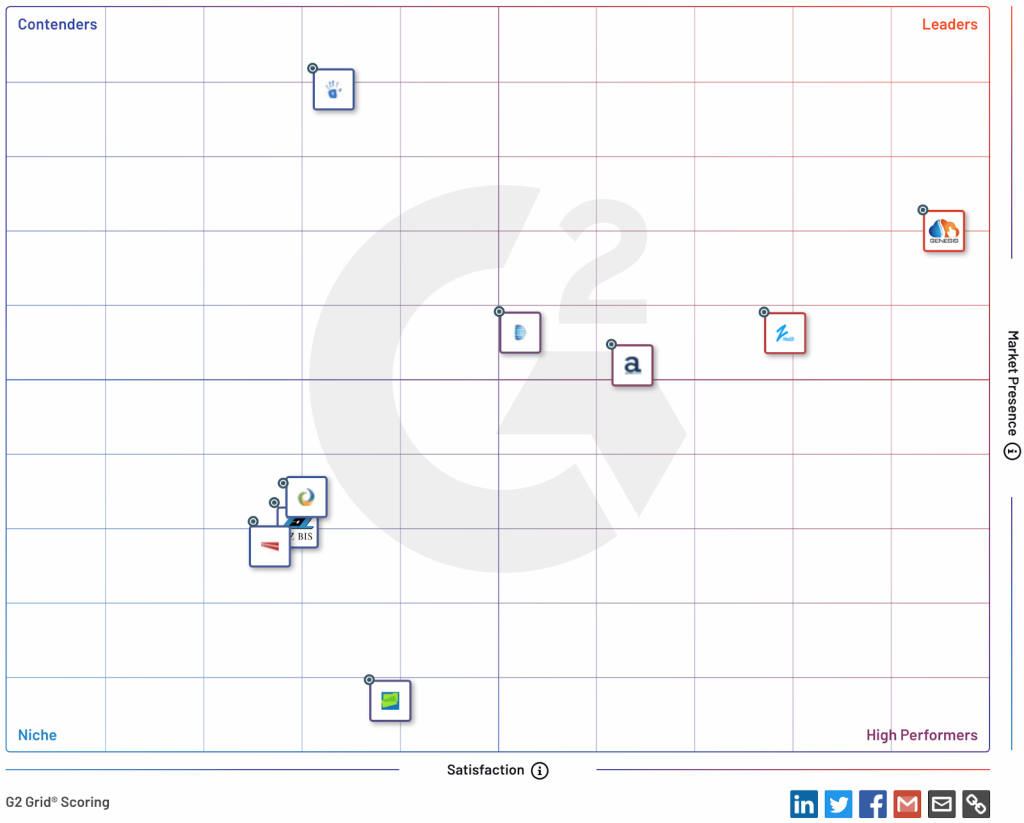
The use of Software as a Service (SaaS) in healthcare has transformed medical practice management by offering scalable, cost-effective, and AI-integrated solutions. SaaS shifts system management responsibilities to vendors, allowing healthcare providers to access applications without the need for significant upfront investments. Selection criteria for a SaaS vendor include functionality, training, performance, HIPAA compliance, and more. Platforms like Capterra and G2 simplify the evaluation process, with Genesis Chiropractic Software being recognized as a leader in chiropractic software. In conclusion, SaaS in healthcare offers convenience and efficiency, with AI integration enhancing automation, patient engagement, and data security.
Discovering a True Partner in Genesis Chiropractic Software: Dr. Melinda Richardson’s Testimonial
In the bustling heart of San Jose, California, you’ll find the renowned Posture Lounge, led by Dr. Melinda Richardson. With her years of experience and dedication to her patients, she understands the importance of utilizing the right tools to ensure the smooth operation of her practice. In a candid testimonial, Dr. Richardson recounts her journey with Genesis Chiropractic Software. Starting her narrative from 2020, she passionately shares her experiences, shedding light on what sets Genesis apart from other EHR systems. A Journey from Discontent to Satisfaction Before Genesis, Dr. Richardson struggled with an EHR provider with lackluster customer service. The shift to Genesis was like coming home, she recalls. Their unwavering support, patience, and positive attitude made all the difference, especially during the challenging phase of implementation. Innovative Features that Empower Chiropractors Dr. Richardson is particularly impressed with the ease of using the software, be it for soap notes, patient kiosks, or the specialized app. The capability to integrate patient X-rays seamlessly and the visual features that cater to her CBP methods further enhances her practice’s efficiency. For her, the tools Genesis offers aren’t just about record-keeping but also about enhancing patient experiences. A Promise of Longevity What’s clear from Dr. Richardson’s testimonial is the trust she has placed in Genesis. Its affordability coupled with robust features assures her that this is a relationship she’s keen to maintain for the long haul. In the world of chiropractic care, having a dependable software partner can be transformative. Genesis Chiropractic Software is not just a tool but an extension of a practice’s mission to provide the best care to its patients. Are you intrigued by Dr. Richardson’s experience and wondering how Genesis can elevate your chiropractic practice? Become part of the Genesis family, and let’s create success stories together.
Genesis Chiropractic Software Stands With The Chiropractic Defense Council
In the ever-changing realm of healthcare, one thing remains certain – our unwavering commitment to support the profession we wholeheartedly believe in. Chiropractic, a therapeutic practice rooted in natural healing, is facing challenging times. We, at Genesis Chiropractic Software, have and will continue to support the Chiropractic Defense Council (CDC) in their endeavor to safeguard chiropractic rights and practice. As chiropractors, you’ve dedicated your life to the healing profession, navigating through philosophical differences and regulatory challenges. The past years, especially, have seen unforeseen struggles. The world was hit by a pandemic, turning our lives upside down and putting chiropractic practice under fire. Governmental restrictions and mandates were imposed, altering our abilities to practice freely. Fear not, as Genesis Chiropractic Software and the CDC are here to ensure your voice is heard and your rights are protected. The questions we are now asking ourselves are new and unfamiliar. “How will the recent vaccine mandates affect my practice? Will they try to shut me down? Will my ability to take X-rays or treat children be restricted?” These fears are genuine, and we are here to address them. The CDC was established in 2021 to be that beacon of hope for chiropractors worldwide. It arose from the need to protect individual chiropractor’s rights against heavy-handed regulations and oversight. Their mission resonates with us at Genesis Chiropractic Software – to reengage a profession that is largely disengaged and to revitalize our collective spirit at both local and national levels. We believe in the CDC’s vision to reinvigorate a global chiropractic community that is facing threats it’s never faced before. We stand firm with the CDC in making chiropractic the #1 healthcare option. This isn’t merely about protecting the rights of practicing chiropractors; it’s about our commitment to health, our dedication to natural healing, and our duty to ensure that our profession thrives. In this post-Covid world, the need for chiropractic practice is more pronounced than ever before. We are all in this together. Genesis Chiropractic Software is here to support the CDC in their mission, and we encourage all chiropractors to join us. It’s time to stand up, unite, and secure the future of our profession. Let’s make chiropractic the #1 healthcare choice worldwide. It is time to reclaim our rights, our practice, and our profession. Together, we are stronger. To learn more about and support the Chiropractic Defense Council, you can visit https://www.defendchiropractic.org/ and learn much more.
Coming Soon! New Genesis Features!
We are thrilled to announce an exciting range of new features that are set to improve your workflow! Soon, you will be able to experience the Incoming Fax Queue, Roster Check-in, and the Images Chart Component – Drag and Drop Images enhancements. Each of these tools has been carefully designed to streamline your daily tasks, optimize patient data management, and improve overall efficiency. Although these features are not live yet, we wanted to give you a sneak peek into the powerful functionalities that we are preparing to roll out. Get ready to discover how these innovative features can reshape your practice’s operations, offering convenience and productivity like never before! Incoming Fax Queue The Incoming Fax Queue is a revolutionary feature that streamlines the process of incorporating faxed documents into a patient’s records. This feature allows practices to maintain a dedicated fax queue, designed to expedite the task of adding numerous faxed documents directly to a patient’s files. Displayed in the fax queue is a wealth of pertinent information, including the document name, the date and time of faxing, relevant practice information, the source of the document, the date of service, and even the caller ID. This consolidation of details facilitates swift and accurate processing of the faxes. Upon selecting a fax in the queue by clicking the associated checkbox, the patient document will be presented on the right side of the page for easy viewing. This feature fosters efficiency and eliminates the need to toggle between screens or software. An added advantage of the Incoming Fax Queue is the ability to bulk-add multiple faxed documents to a patient’s chart summary. This is particularly beneficial for practices that handle large volumes of patient documentation, reducing manual data entry tasks, and enhancing the overall workflow. Roster Check-in Introducing the Roster Check-in, a transformative feature enhancing the efficiency of patient management within the Document and Bill system. The feature brings the convenience of checking in patients directly from their appointment details on the Roster, simplifying the administrative process. Located on each appointment is a new Check In button, an intuitive tool that empowers Clinicians to swiftly and effortlessly check in patients. With just a single click, clinicians can mark a patient’s arrival, eliminating the need for additional steps or navigation through multiple interfaces. The Roster Check-in functionality streamlines the entire appointment process, improving the workflow and saving invaluable time and effort for all. It blends seamlessly into the existing system, making the process of managing appointments, check-ins, and cancellations an effortless task, all from a unified location. Images Chart Component – Drag and Drop Images Finally, we are introducing the Drag-and-Drop Images feature, a new addition to the Images Chart Component within the patient’s chart summary. This feature enables users to effortlessly incorporate image files directly into the Images Chart Component by simply dragging and dropping them from their computer or device. This feature has been designed to handle multiple image uploads at once, providing flexibility and convenience for users dealing with an array of image files. After the images are dropped into the chart component, a new window will automatically appear on the screen, prompting users to update the following information related to each image: Title Source Image Date Comments This input process ensures that every image uploaded is clearly identified and organized within the system, contributing to more comprehensive and effective patient records. The Drag-and-Drop Images feature also allows for easy editing of the image’s information. By hovering over an image, a pencil icon will appear. Simply click this icon to edit any of the image’s details at any time, offering maximum flexibility and control over your patient image data. As we conclude, we want to express our sincere gratitude to each and every one of you. Your invaluable input and feedback have been instrumental in guiding our development of these new features. We deeply appreciate your continual contribution towards helping us understand your needs and challenges better. It is your unique insights and experiences that enable us to bring to you features that truly make a difference in your daily operations. We remain committed to our mission of creating solutions that enhance your work-life, and with your ongoing support, we look forward to delivering even more innovations that align with your actual needs. Thank you for being an integral part of our journey.
Maximizing Efficiency and Support with Genesis Chiropractic Software’s Real-time Chat Function
As the world continues to evolve at an unprecedented pace, customer service and support have become an integral part of any successful business. Recognizing this, Genesis Chiropractic Software has implemented a real-time chat support function, designed to make your experience with our software more efficient, intuitive, and responsive. The Power of Real-time Chat Support The primary benefit of real-time chat support is, without a doubt, its immediacy. Have a question? Encounter a hiccup while navigating our software? Instead of feeling stuck, you can now instantly connect with one of our knowledgeable customer support agents. This feature eliminates the time-consuming process of drafting an email or waiting on hold over the phone, ensuring your concerns are addressed promptly and effectively. Moreover, this real-time chat support enhances user experience by providing interactive, step-by-step guidance. You can ask questions as you navigate the software, getting answers and instructions that are catered to your exact point of need. This tailored support fosters user confidence and software proficiency, helping you get the most out of Genesis Chiropractic Software. A Multifaceted Support System While our real-time chat function is great, we understand that it may not cater to every user’s preference. That’s why we offer a comprehensive support system that includes tasks, emails, and phone support, ensuring that each user can choose the support method they’re most comfortable with. Bringing It All Together At Genesis Chiropractic Software, we believe in empowering our users with a diverse set of support options, and our real-time chat function is the latest addition to our comprehensive suite of services. Whether you prefer chatting, tasking, emailing, or phoning, our goal is to ensure that you feel supported every step of the way. By implementing these various support methods, we aim to cater to different communication styles and needs, making the experience of using Genesis Chiropractic Software as seamless and user-friendly as possible. We are committed to your success and strive to provide you with the tools
