
Chiropractic SOAP Notes
Dr. Troy Dreiling speaks about Chiropractic SOAP notes – Audit Risk and Billing Management Chiropractic SOAP notes – Audit Risk and Billing Management – Dr. Troy Dreiling
What Dr. Charlie Majors Has To Say About Genesis

Dr. Charlie Majors has used Genesis Chiropractic Software for many years. Listen to his insights on what many DCs consider to be the best chiropractic Software. https://youtu.be/jg-xJhXjeNM
Genesis Chiropractic Software SOAP Notes
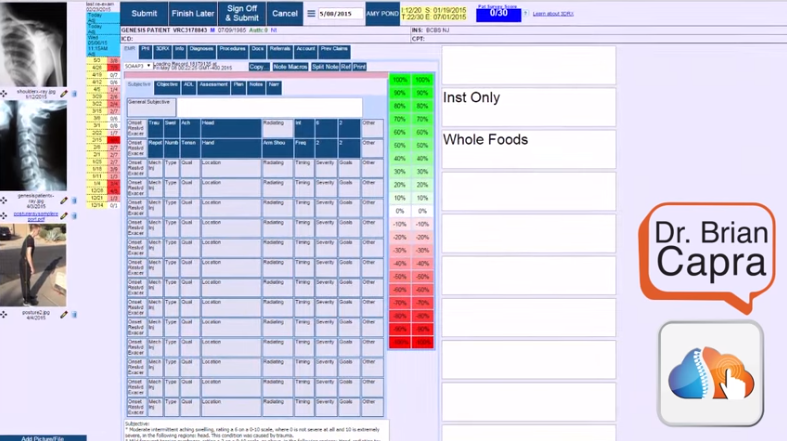
SOAP notes: Love them or hate them, they’re necessary to document your patient’s visit, prove the treatment services rendered and ultimately get paid by the insurance companies. The chiropractic SOAP notes provided in the Genesis Chiropractic Software level the playing field with the insurance companies. The required documentation can be completed in 30 seconds once you’re familiar with the interface. The interface lets you know if somethings wrong with it before you sign off on the claim and send it to the built-in claim scrubbers. The claims are then checked against a million insurance rules to ensure that the submitted claims will be paid and not rejected for a small reason like missing demographic information. https://youtu.be/OwzoqGZMtIM
The Leading Chiropractic Office Profitability Management Solution for Doctors

For those who run a chiropractic practice, Billing Precision offers comprehensive billing services that increase efficiency and profitability on many levels. Utilizing the online service, chiropractors are able to create SOAP notes that stand up to any and all insurance audits, coordinate all aspects of their practice and drastically reduce no shows, which are a drain on their profit stream. Earnings increase, staff time is used more efficiency and the practice functions in a more organized manner when this chiropractic billing software is employed. Compliant SOAP Notes Clear, concise SOAP notes are essential if a practice is going to survive insurance audits. Once you establish the reliability of your notes and pass an audit, your practice will be confident if audited again. SOAP notes done through Billing Precision are easy to fill out (it takes seconds) and they provide doctors with an accurate picture of each aspect of their exam and observations. These notes are easily stored and accessed. Billing Precision SOAP notes are designed to be compliant with insurance regulations and because they are supported online, they are always up-to-date when laws change. This feature can increase profitability by thousands of dollars each month and save staff and practitioners a wealth of time. Office Staff, Exam Room and Billing The chiropractic billing software from Billing Precision ably coordinates a practice’s scheduling and reception area, exam room activities and billing services. It also gives chiropractors various options such as the ability to outsource invoicing to Billing Precision. Each aspect of Billing Precision’s software is adaptable and easy to learn. Thus, you can schedule appointments, submit insurance claims and track patients with the click of a mouse. No Shows No More Along with insurance audits another aspect of the healthcare industry that reduces profits are no shows and appointments that cannot be billed. Billing Precision is designed to drastically reduce no shows with its automated patient reminder system. This aspect of this premiere chiropractic billing service is highly configurable and offers scheduling information in an easy to read, color coded system. The average chiropractic practice averages a no show rate of 30%. With 300 patients per week, that would be 90 missed appointments. With that type of no show average, a practice stands to lose thousands each month. With an integrated, automated online system such as Billing Precision over five years a chiropractor can save hundreds of thousands of dollars. All-in-One The all-in-one approach that Billing Precision has taken in designing and implementing its online chiropractic billing software gives doctors a real edge when it comes to realizing more profit. Utilizing an online service that is constantly updated to conform with federal regulations and that provides practitioners with flexibility translates into more money on the plus side of the ledger and a more efficient and productive use of time by doctors and staff members. Billing Precison’s all-in-one product was named Genesis Chiropractic Software and this blog is part of the website.
Chiropractors: Find the SOAP Solutions You’ve Been Looking For!
Too often health care professionals when meeting with patients take sketchy SOAP notes or they may not take them at all, deciding they will make them later in the day. Then the health insurance audit occurs and when the doctor is unable to substantiate the claim, they may lose hundreds or even thousands of dollars. Unable to defend the audit, the doctor is audited even more and they lose even more revenue. SOAP Notes Needed In healthcare, these are the standard for substantiating a patient’s visit and treatment. SOAP stands for Subjective, Objective, Assessment and Plan. With each patient visit, the chiropractor fills in each of the four areas. Together these areas include an evaluation of the patient on both a subjective and objective level, an assessment of their condition and a plan or outline for treatment. Seconds Save Thousands The chiropractic billing software from Billing Precision includes SOAP notes that may be filled out quickly on your laptop when meeting with a patient. This means that you’ll always have the backup required by health insurance agencies. This virtually assures you that a claim will not be rejected. Additionally, once an insurance agency knows that you possess the proper documentation there is less of a chance that you’ll be audited again. Each area of your these can be instantly accessed and quickly filled in. Once created, the record is incorporated into each and every aspect of your patient’s file, making it easy to access and share the notes when needed. They may also be easily updated. Web Based Software Web based chiropractic billing software will give you the ability to connect with health insurance providers and allow them to gain easy access to your these notes. This will facilitate all paperwork, speed up processing and encourage more timely payments. Accurate and Thorough SOAP notes from Billing Precision offer the kind of solution that’s needed today. Highly automated, detailed and conforming to industry standards, these SOAP notes offer chiropractors an ultra-simple solution that they can use to boost their profits and cut down on the amount of labor they must put in. The result is a practice that is functioning at peak efficiency. No Paper Needed With no paper needed and files kept securely and easily, chiropractic billing software such as that from Billing Precision offers solid solutions when it comes to SOAP notes. This software is totally integrated, which means that the SOAP notes are not an isolated feature. This is an aspect that makes this chiropractic billing software exceptionally valuable to your practice.
Chiropractic SOAP Notes Provider Helps Doctors Prevent Insurance Audits
Billing Precision Lives Up to Its Name When it comes to chiropractic billing accuracy is essential. Incomplete or inaccurate SOAP notes can lead to a doctor having to refund thousands of dollars of medical reimbursements to payers. That is, the health insurance agencies. SOAP notes (SOAP stands for Subjective, Objective, Assessment and Plan) are a central aspect of the patient documentation process and the workflow as chiropractors share the information with personnel within their office, including schedulers and billing, health care professionals outside of the office and other agencies and organizations as is appropriate. Exactness is Important The SOAP notes software from Billing Precision addresses insurance issues before they ever become issues. In other words, the notes are setup in such as way that chiropractors are able to fill them out in a matter of seconds in the presence of patients. This helps to ensure accuracy in many ways. First, the ability to take notes immediately means that chiropractors are able to document a patient’s condition with accuracy benefits the patient in their treatment and the practice workflow enabling patient appointment scheduling, the effective creation of notes and timely medical billing. The software makes it easy for a chiropractor to send notes to others via the Internet and storage and access if immediate. The Dreaded Audit If there’s one aspect of chiropractic billing that a doctor dreads it is the insurance company audit. Audits occur when a company questions a chiropractor’s bill. For every dollar an insurance company spends on an audit, they make an average of approximately $13.00 That 13:1 ratio is a big payoff for the insurance companies and a major hit for chiropractors if they are unable to backup a patient’s treatment with clear, succinct notes. That’s when something like the software driven SOAP notes are indispensible. They work wonders in keeping a chiropractor organized, giving them and their staff the ability to access and use their notes at any time. Taking Care of Business Chiropractic billing, scheduling and follow up are all made easy with Billing Precision’s SOAP notes. When a payer requests notes rather than offering an Explanation of Benefits (EOB) or payment, it can be handled quickly. With Billing Precision, chiropractors can create their notes with two to three screen touches, can integrate their bill, insurance claim and care plan records with ease and save money and time, reinvesting them into their practice. Keeping the Workflow Going The income, scheduling and virtual paper stream are uninterrupted with a specialized software notes program. For chiropractic billing, there’s no easier way to keep their business organized. Fully integrated SOAP notes is one way that chiropractors have found to improve productivity and cash flow and to prevent insurance audits.
