
What is a Monthly Health Check?
A Monthly Health Check will help you. Have you set your practice goals with your Practice Success Coach? A Monthly Health Check for your practice and how it can help you is what’s covered in this free webinar. Your Practice Success Coach will help you set goals and KPIs for your practice and then follow-up with you about them each month. You will know immediately if you’re on-track to reach your goals and if not, then your Practice Success Coach will suggest ways to make improvements. You will learn a lot about your no shows, no future appointments, your collections for cash and insurance, your accounts receivable over 120 days and other important metrics. If you don’t track them, then how can you improve? Learn more by watching this free webinar on this page right now. Read the transcript: Jason: Let’s start over. Welcome, everybody. I hope everyone dug out of the storm and has able to remain warm at least here on the East Coast from Kentucky up to Massachusetts. I know buried is just the right word to use as far as snow is concerned, buried. I know we dug out from nearly two and a half feet of snow here. And so I hope for those people who are only able to make this webinar today because they weren’t able to open their business doors, I hope that you find it useful and I hope we’re able to give you some information that you can act on here in the future. So just to give you an idea of who I am, Jason Barnes, I’m the Chief Operating Officer, and I’ve got Jessica Pancoast with me, who is the head of our Help Desk and Training teams. And we usually tag team these weekly webinars, bringing useful information to everyone today. We’re gonna spend 15 to 20 minutes on monthly health checks, answering questions like, “Why should I have a monthly health check? What is a monthly health check? How can a monthly health check help me with a member of our coaching staff?” And then we like to open it up for any other questions that you might have at the end of it, so while we stick around to see how we can answer any other questions. So first answering a question of, “When somebody looks for a new software package, what are they looking for?” Well, that ranges from one office to the next with what types of problems that they’re going to solve and what kind of solution they’re looking for. Yes, it would be hard for me to say, “I know where the right solution for every single office out there.” But I know we do have something for everybody. And just like people use personal trainers to get the most out of a gym experience or workout experience, I know that we have people who can personally train and apply the tools in our gym, meaning the software system, to help practice owners, office staff really get the most out of what they want to accomplish. So today we’re gonna be talking about teamwork and how we can use our coaching staff to help identify what the issues are in your practice and then at least supercharge it, make it as efficient as possible. And so I want to fast forward all the way to the end of what you’re supposed to be getting out of working with our coaching staff. When most practices come on board, we take a snap shot, take a snap shot of what their practice performance was. How many visits they have, how many patients they were seeing actively at any given time, and what their per visit reimbursement rate was, and then what their overall office collections. And then we compare that after six months for a random subset of those clients, and we found that in each and every situation where those offices were having monthly health checks with our team, we were able to see pretty stark improvements after a six-month time frame. So, if you’re wondering, “Well, you know, how would working with somebody help me achieve those types of results?” That’s what we’re gonna talk about today. So, to answer that next is, what is a monthly health check? The first thing a monthly health check is is a prioritization. Your office can be working on 20 different projects at once. I can start listing off things that you could be working on. You could be working on implementing new no-show, no future appointments. You could be trying to get a business within the business off the ground, trying to put together e-commerce or selling more point of sale items. You could have a problem with hiring associates, training staff members. All of these things are important. Everything I listed is super important. But while that’s happening, you don’t have some of these credentials. While that’s happening, you don’t have the ability to realize that temptations, you know, didn’t show up this week and they’re never coming back again. So what we like to do during monthly health checks is, first of all, create a table in which we know what is urgent, what’s a necessity, and how on earth we should approach triaging, the things that need to be done in your practice. Are we able to do this for everything? No, but most things that are under the umbrella of good, solid best practices of practice management, we’re gonna be able to provide solid insight. We put together this graph and this decision making tree to help really coach providers in a situation with what should I be focusing on first, right? So the urgent, not urgent, managing and focusing. Patients are the lifeblood of your office. They’re always the first thing that we have to make sure… If we’re not paying attention to them, we know that every other metric in your practice is going to
Care Plan Compliance built into Genesis Chiropractic Software
Care Plan Compliance can be Increased for Your Patients Automatically Care plan compliance – Do your patients comply with their care plan? What happens when your patients start to miss their visits? Are you notified? Do your care plans automate patient reminders? Discover how to automate your patient’s care plan with this 30 minute webinar. Learn more about our care plans and how you can more effectively utilize them and all of their features. Please fill out the form below and the video will begin to play right on this page. We know it’s a lot to ask for your email address, but we promise to never sell your email to another company. Read the transcript: Jason: All right, so welcome everybody. It’s about four minutes past the hour and we’re talking Care Plan Compliance today. Jessica Pancoast, head of our training team and our help desk, is with us, here to keep me on the straight and narrow path, which she can no longer do this week anyway with an odd glance or two because we’re in separate locations which happens infrequently. So she’ll have to figure out some other way of doing it. That being said, we’ve got quite a few people today that are joining us. We’re going to start sharing screens right now and we’re going to get kicked off. So because so Jasony people are with us today and almost as always, please…what do we have here? You’re going to have to chat in questions and please, you’re welcome to do so. We still have a discrepancy of about six people, Jess, that are in the web portion of it but not in the audio portion. Jessica: All right. I’ll send another message while you start sharing your screen. Jason: Awesome. Thank you so much. A patient walks through your door. Maybe they’ve never heard of the type of treatment that you’re going to propose and they’re not necessarily up on, you know, what they can do to help themselves get better. They’ve been on medications forever. They want to make better choices. They’ve never thought about health care costs being what they’re proposed. When you see them, they’ve only paid some copays throughout the year and the drugs always seem like they were so worth it, but they don’t feel right and they’ve never felt right and what you’re telling them to do is a complete and total deviation of what they’ve been told their entire lives constitutes health care. Today we’re talking about that big change that needs to take place, how patients perceive it, how often they need to be talked about to…how often they need the reminder, I should say, of how important the commitment they made is, and if they don’t do it all, that they’re not going to see the results. You might be asking yourself, “Well, I really just want to see a care plan that helps me with the finances.” We’ve actually gone over the financial aspect of care plans in this forum before. We’ve created those webinar links and they’re available. We can send them to you, you know, send us some feedback at the end of them if you’re struggling to find them. We will make sure we email out those links to the webinars we’ve done in the past about the financial portion of it. But today we’re talking about those patients that, they were committed at the time they walked through the door, they went in for a report of findings, they signed up for our care plan, and they knew it. Intellectually it made sense to them, academically it made sense to them. They committed to a care plan of x number of visits, but it’s a complete and total lifestyle change. Everyone here knows that they need to be sold again. They need reminders. What types of reminders are we talking about today? Today we’re talking about those reminders both in and out of the office. We’re talking about automating those reminders, we’re talking about reminding them of the commitment that they made, we’re talking today about how you can use a system to prompt you and your staff to make those connections. We know that not every single patient will stay a patient for life, but we can do whatever possible to make that number as large as it can possibly be. And without these reminders, we found that practices have…not all of them, but a lot of them have struggled to get the results that they’re looking for. So I want to make sure that everyone viewing today knows it’s available to them. A patient comes through the door…let me move this over here and we’ll start back from the beginning…for their first appointment. Their first appointment, you can set up all sorts of reminders. Let’s make sure they get calls, text messages, emails about the appointment. That’s the first set of reminders that we can talk about here. And I’ll just bring up one example of a third party carrier…and we talked about this last time…that we’re really pleased with and we’ve got a lot of good feedback on and that’s Zingit. Zingit reminder call, we have a lot of other options, but this is one of the premier ways that you can use to keep in touch with a patient, reminding them of a visit. However, is it just reminding them of a visit that we want to do or is there more? So today there’s also now SMS marketing that they’re offering. So if you’re using us right now or you’re considering using us as a platform to meet your practice’s needs, we want to talk about reminders that not only are targeted at letting them know, “Hey, you committed to a visit,” but why they’ve committed to a visit. We don’t offer this ourselves as a technology platform, Vericle, but what we do offer is the access to get information. How is it
Genesis Chiropractic Software Releases a New Care Plan Solution for Chiropractors
Automated Care Plan Management Software Is Now Available with Genesis Chiropractic Software Genesis Chiropractic Software helps practice owners automate patient care planning and monitoring. Their Care Plan software creates an agreement between the practice owner and the patient that automatically manages all five aspects of the patient care plan, including financial, scheduling, monitoring, notification, and projections. According to Dr. Brian Capra, President of Genesis Chiropractic Software, design and tracking a comprehensive care plan is very complex. “Patient will not commit to care if they cannot easily understand their financial commitment. As importantly, chiropractic office owners must stay compliant by charging, adjusting, and writing off the correct amounts. In our experience, insurance companies leverage any opportunity to delay longer and underpay more insurance claims. We leverage the cloud, billing experts, and Artificial Intelligence to create an effective and easy to use individual patient care plan,” says Capra. About Genesis Chiropractic Software by Billing Precision, LLC: Genesis Chiropractic Software by Billing Precision was designed by chiropractic business owners with both patient experience and practice profitability in mind. Genesis chiropractic software provides a complete chiropractic practice management system that supports every role in a busy chiropractic practice, from the owner and practitioners to the front desk and back office. It automates the vast majority of standard tasks, including patient relationship management, revenue cycle management, compliance and office management. Its exclusive workflow functionality continuously improves productivity, control and predictability, fostering teamwork and time savings, which leads to greater profitability and practice growth.
Genesis Chiropractic Software Releases a New ICD-10 Solution for General Equivalence Mappings

(PRWEB) August 24, 2015 Genesis Chiropractic Software and Billing Network is taking a unique approach to helping their clients make a smooth transition to ICD-10. Their 5-part strategy called Genesis GEMs Plus ensures that doctors make the best ICD-10 code selection. Learn more by watching the ‘What Insurance Companies Don’t Want You to Know About ICD-10’ Video on demand HERE. “Doctors who rely solely on [the bare-bones] GEMs for ICD-10 shortcut provided by CMS are headed for financial disaster,” says Dr. Evan Gwilliam of ChiroCode Institute. “We have used the cloud to analyze over 22,000,000 insurance claims in the past 10 years,” says Dr. Brian Capra, Genesis Chiropractic Software President and Co-Founder, “Without that kind of data it is difficult to see insurance companies trends. The writing is on the wall: the bare-bone GEMs is not enough by itself. The only thing that is certain about ICD-10 is that every insurance company will use it differently and they will change their tactics as time goes on.” The GEMs Plus is available before the transition occurs and it is also adaptable to keep up with insurance companies changing requirements after the transition. Genesis is the only cloud based billing network with the data and the technology to help doctors make a smooth transition from ICD-9 and reduce risk of post payment audits as we move into the pay for performance healthcare model. Learn more by watching the ‘What Insurance Companies Don’t Want You to Know About ICD-10’ Video on demand HERE About Genesis Chiropractic Software: Genesis Chiropractic Software was designed by chiropractic business owners with both patient experience and practice profitability in mind. Genesis chiropractic software provides a complete chiropractic practice management system that supports every role in a busy chiropractic practice, from the owner and practitioners to the front desk and back office. It automates the vast majority of standard tasks, including patient relationship management, insurance billing, compliance and office management. Its exclusive workflow functionality continuously improves productivity, control and predictability, fostering teamwork and time savings, which leads to greater profitability and practice growth. Genesis also offers an optional outsourced billing service.
Improvements to the Genesis SOAP note coding
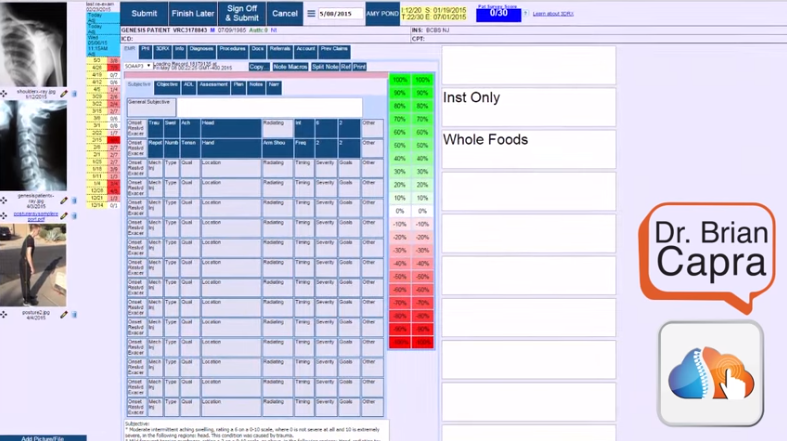
Dr. Brian Capra quickly demonstrates an improvement to the Genesis SOAP notes coding feature. If you click the new button with an arrow on it, then you can copy the diagnosis codes and the procedure codes from your chiropractic documentation SOAP note to the billing claim.
Chiropractic Biophysics Suite Documentation Demo Video

Use the Chiropractic Biophysics Suite for Your Chiropractic Documentation! Is your chiropractic documentation slow? Do you type a lot? Dr. Brian Capra introduces Dr. Jason Haas who demonstrates the CBP Suite Documentation built into Genesis Chiropractic Software. Watch Dr. Jason as he goes through every option available to you on his touch screen.
Chiropractic Documentation Fast and Compliant Notes
Fast and Compliant Notes for Chiropractic Practices Documenting cases quickly while remaining compliant with both insurance and government regulations seems like an impossible task. Especially when you factor in the images, forms, tests and more that go into proper documentation. Fortunately, it’s now possible to compile all the information you need, quickly, from a single screen. Watch this webinar to find out how! Read the transcript: Reuven: Welcome to Genesis’s webinar on compliance. Today we’re gonna talk about the travel card. My name is Reuven Lirov. I am currently the Chief Growth Officer and I work with over 500 practices and more than 1,600 practice staff across multiple specialties. My team posts more than $10 million in monthly insurance payments, focusing on finding ways to accelerate practice cash flow, improve compliance, and foster office staff teamwork. In the past 5 years, our clients have seen an average revenue growth of over 186%, patient visit growth of over 141%, and an 86% increase in patient visit compliance. So let’s get right down to it. Really what we wanna talk about today is the need to be able to complete and review documentation as quickly as possible. And this is a need that comes up all the time. Anytime we talk to some who is struggling with their current solution opening a new office, expanding their office and needs something that’s more scalable, the biggest problem they have is that they wanna spend more time with their patients, less time in a solution, and they wanna still stay 100% compliant with state insurance and federal requirements. So it’s a really difficult problem to solve, and each issue plays into the other. So this problem is really critically important because documentation obviously is a critical component to practice success. You know, one thing that happened to me a lot was as an EMT was when I was in college, we would constantly have to be reminded of the need for very, very clear documentation, especially when you’re dealing with outside patients where, you know, if you didn’t write it down, it didn’t happen. And that was the go-to phrase that we would give to new recruits, “If you if you didn’t write it down, it didn’t happen.” And even though you’re trying to do that, the goal is to have notes that take seconds. You wanna be able to spend most of your time interacting with your patient and a fraction of that time documenting so that all of your patient interactions are maximized. Because at the end of the day, it’s all about making sure that that patient is getting better and that patient is getting so much better that they’re feeling compelled to bring in their family, and their friends, and anyone else that they know that may be suffering or need your help. So even though we understand what this problem is, we understand why it’s important, there are still so many practices out there that are struggling, and so it’s obviously a difficult problem. And so compliant notes really struggle to be fast notes. That’s not an easy problem to solve, and if it didn’t matter how specific the notes were to anyone but yourself, you would do what a lot of providers do today, which if you ask them, you know, they’ll admit to it, they won’t be happy about it, but the reality is a lot of them scribble notes down. And if that’s you, don’t worry about it, we’re here to help. You know, a lotta the time I hear things like, you know, scribbling things down, stuffing them into a paper file, and spending the majority of your time with your patient, which is what you should be doing, really. But you really don’t have a choice because, you know, you need to have a compliant note and you need to have a referring patient. And so obviously this won’t work. You know, you gotta be able to finish your notes quickly, but you still have to stay compliant. And, you know, if that’s not something that you’ve struggled with recently, statistically speaking, every practice, if it’s in business more than five years will eventually get audited by a state board or a regulatory agency like an insurance company, something like that. So get ready for that. And it’s…you know, if you haven’t done it yet, it’s time to get that house in order. So documentation often spans more than just soap notes. So when you think about documentation, we have to think about the entire patient’s care. And so the soap note is one piece of that, your subjective objective ADL assessment and plan, but there’s also images, there’s forms like intake forms, and verification of benefits, and medicare forms, lengthy tests, and so much more, especially if you’re dealing with a multi-specialty practice where you’re bringing in, you know, different specialties that compliment your own. So the question is really, what’s our approach? You know, the reason why we’re so successful in working with our practices is because we look at the practice the way you look at your patients. Instead of trying to solve an individual symptom, which is I spend too long documenting, we really wanna understand the root cause of the problem. So we wanna look at this really in five areas. We wanna talk about the patient’s travel card, we wanna talk about that patient’s history, wanna talk about billing, wanna talk about personal notes, we wanna talk about documentation. A lotta the time I hear things like, “Well why do I need to talk about billing if we’re talking about documentation? Why do I need to talk about the patient’s history or even scheduling when I’m talking about documentation?” And so when you try to take into account the issues surrounding documentation and trying to get patients better, if you’re not able to connect your billing the rest of your documentation to your soap note, including
PostureCo Integrated Within Genesis
PostureCo, Inc. is a technology company focusing on posture analysis and spinal x-ray mensuration EMR products for healthcare professionals. In its PostureRay and PostureScreen Mobile applications, PostureCo uses computer images from a wide variety of formats to digitize specific anatomical locations, thereby generating documentation from everything from spinal health screenings to X-Ray documentation. “When it comes to the spine, and addressing the issues I see in my practice, the more information I can provide my patients, the better. The detailed reports that PostureRay generates show exceptional detail, making it much easier to demonstrate and explain to patients where problems exist, and how adjustments can help. Further, as a patient goes through treatment, these images give them the opportunity to see just how much they’ve progressed, the corrections that have been made, and exactly how their pain has been eased. All of this adds up to greater patient understanding, compliance and satisfaction.” –Brian Capra, DC “One of the biggest challenges, as a chiropractor, is to be able to convey to my patients exactly what needs to be done, and why. Even with X-rays, there’s a level of remove between the images and the person’s comprehension of the problem. That’s what makes PostureRay such an indelible part of my practice. Their reports — which I know are backed by years of spinal research — present dynamic pictures that enhance patient education. It gives people a true inside look at what’s causing the problem, allowing me to easily demonstrate how I can help.” –Joseph Ferrantelli, DC
Documentation | Keeping Notes Compliant

Cooking Up a New Plan Can Dr. Ben make the commitment to find a better way to achieve fast and compliant patient notes? Ben arrived home after a busy day to find Carmen reading to Jonathan on the couch. He swung Jonathan up in his arms and gave him a firm hug. “How was your day, Daddy?” asked Jonathan. “It was so busy,” Ben said. “I’m tired but very happy to be home!” Jonathan gave Ben a big hug back, then turned to Carmen. “Mommy, I’m hungry,” he announced. This was not surprising, because Jonathan was always hungry. “Jonathan, why don’t you go upstairs and finish your homework,” said Carmen. “Your daddy and I will get started on some dinner for everyone.” Carmen squeezed Ben’s hand as they walked toward the kitchen. “So tell me about your busy day,” Carmen said. “Well, Luisa and I had a really good conversation this morning and I’ve been thinking about it all day,” Ben said. “We’re both getting pretty frustrated with patient notes. I have to write everything down – every single detail of each patient visit – and then Luisa has to take my notes and enter them into our system, along with images, forms, test results and more.” “That sounds like you’re doubling the work for yourselves,” mused Carmen. “Plus, you know, I’ve heard Luisa give you a hard time for your handwriting.” “Yes, that’s certainly a continuing topic of discussion in the office,” admitted Ben. “But it’s so important to capture every detail. Medical professionals have it drilled into their heads that if we don’t write it down, it didn’t happen.” “Sounds just a bit like our inventory process at the pizzeria,” said Carmen. “Every tidbit of food that gets pulled out of the freezer or off the shelves has to be recorded. I have to know how much we use of everything and how quickly, or else I may not reorder in time. If we don’t have the ingredients customers want, they may never return – and they certainly won’t refer us to their friends and family.” “Luisa and I were talking about that today,” said Ben. “The less time we spend on patient notes, the more time we can spend on patient interactions and care. Happy and healthy patients are going to be much more likely to refer us to others.” Carmen nodded. “Plus, my bookkeeper needs to track my inventory costs in exquisite detail, or else we might be in trouble if there’s ever an audit,” he continued. “So even though I grumble about what a pain it is to manage and report on our inventory, I make sure to dedicate enough time to the process to do it right.” “You know, our Genesis coach, Charlie, has warned us that every practice that has been in business for more than five years will likely be audited by a state board or insurance regulatory agency,” said Ben. “It’s been a while since our last audit – we really need to do better with our documentation. We need to be able to have notes that are both fast and compliant with state, federal and insurance rules.” “You know what we really need to do better with?” asked Carmen. “Preparing dinner, or else Jonathan might grow weak with hunger!” Ben laughed and opened the refrigerator to get out the salad fixings. But he knew he’d be thinking more about this issue in the coming days. What are Dr. Ben’s options to simplify the patient notes process while enabling him to remain in 100% compliance with state, federal and insurance rules? Disclaimer: For HIPAA compliance, all characters appearing in this post are fictitious. Any resemblance to actual persons or actual events is purely coincidental.
Visual Embedded Analytics in Your Software
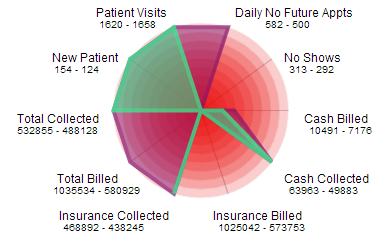
Can of Worms What do the numbers mean to you and your practice? Opening your own practice means opening a whole new can of worms. That’s because there are so many elements that they don’t teach you about in school: aspects of running a business that you’re left to learn on the fly — all while attempting to provide quality care for your patients. One of the most critical components of achieving practice success is making sense of the numbers. There are numbers everywhere, from revenue to no-shows, from patient visits to accounts receivable. When you first start to look at them, it can almost seem like you’re staring at signs in a foreign language, hoping that the context might shed some light on what they mean. Practice management software can help, but until you know what numbers are most important to your practice — and how they signify growth or, conversely, difficulties — you’re still left wading through a mess of mathematical gobbledygook. Fortunately, there are analytics — tools to help you make sense of the data — available, and the best chiropractic software solutions, such as Genesis, embed those tools into the program so that they’re easily and immediately accessible. Offering a visual presentation of the numbers, these analytics finally make it possible for you to interpret and understand the numbers that drive your practice. Examples include: Radar chart — Visually resembling a spiderweb, the radar chart shows multiple variables on axes starting from the same point, radiating outward like spokes on a wheel. The length of the spoke is proportional to the magnitude of the data. This allows you to examine the correlation of values — say, accounts receivable and NFAs — that aren’t otherwise measured in comparable units. Trend report — A trend report presents data on a traditional line graph, thereby allowing you to see the peaks and valleys of your information — and the inter-relation of different data sets — over time. Histogram — With a histogram, you can choose three charts to show you a graphical representation of a single area of your practice over a given time period (weekly/monthly), depending on the selection. This allows you to gauge how your practice is doing comparatively for a set amount of time. Dashboard — A dashboard is an organized presentation of the numbers, so you can get an at-a-glance picture of where your practice stands on collections and outstanding work. Genesis, for example, can show you failed claims, AR > 120 and outstanding tasks — or “tickets” — on a single screen through its homescreen dashboard. Billing Stats Report — This type of report allows you to view claims by date of service. The report can then be broken down in a number of different ways, depending on what you’re looking for (customizable by practice). The Billing Stats Report, or BSR, is very useful for digging into problems. Ultimately, it’s up to you to determine which numbers provide the best snapshot of practice success; however, analytics are the tools that help bring that snapshot into focus.
