
Control Your Claim Flow Visually Using Radar Software
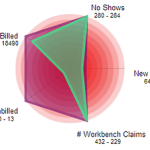
Do you worry about insurance claims payment delays? Lack of control over your chiropractic claims process causes inconsistent cash flow for your practice. If you cannot track and predict your cash flow easily you will have a hard time making your business profitable. You might even drive away patients when you are stressed out, which further hinders the growth of your chiropractic clinic. Ultimately, you cannot achieve any long-term profitability without sufficient growth. Since seeing patients is your priority, you can’t make time to micromanage each chiropractic billing aspect. Addressing the large amount of failing or rejected claims is virtually impossible with limited resources. Nevertheless, you need to follow up on your chiropractic claims to avoid reduced cash flow. Inconsistent and ineffective chiropractic billing performance can have many culprits including incompetent or untrained staff. But no one can adequately keep track and follow up on all underpaid and denied claims without effective chiropractic software. Not correcting these claims causes payment delays and can increase the percentage of your AR past 120 days. That’s why you need to track your active claims backlog and evaluate your chiropractic billing performance. Managing a chiropractic office is a balancing act of multiple Key Performance Indicators (KPIs), though. It can be challenging to prioritize tasks as many chiropractors tackle easy problems first before they focus on more complex matters. You need to keep your eyes on the big picture if you want to improve your claims workflow management and chiropractic billing performance. To accomplish this you need a centralized organization of tasks and performance. It is important to choose the right chiropractic software functionality. You should be able to look at multiple aspects of your practice at once, just like the snapshot Genesis’ Practice Health Monitor (a.k.a Radar) provides. To improve teamwork every member of your staff can also see this Radar chart on Genesis’ Home page every time they log on. You don’t need to waste time on compiling your practice stats, including claims status since data collection is automated. Furthermore, you and your staff can monitor trends to detect any problem areas before they cripple your practice performance. You can track your practice performance over time and measure any improvements with Genesis’ radar. But first you need to customize your workflow KPIs. Your Practice Success Coach then configures your radar to help you reach your goals.
Chiropractic EHR | How much are No Shows costing your clinic?

Do you know how patient No Shows (NS) impact your chiropractic clinic? When patients do not make their appointments and they leave it up to you to contact them to reschedule it tells you a lot. It shows they do not value the adjustment and they are not making the connection between making all of their visits on time and the improvement in their function or health. It is a BIG warning sign that they are an attrition risk. Your time to save them is running out. At the same time the bottom line of your practice suffers due to decreased revenue and wasted time. Follow up on no shows is mission critical. If a patient stops treatment you might have to return any payments received which further reduces your practice’s cash flow. Not to mention that you won’t be getting any referrals from patients who don’t get better. As a result, they must be rescheduled with a sense of urgency. They need to your help to reset their goals, expectations, action plan. You have to help them too take responsibility for their role in their own health. It can save their life, give you a great sense of purpose, and be the most profitable conversation you can have in your business. It is important to know exactly how much income your clinic is losing due to No Shows so that you can measure your improvement. If you replace the assumptions below with your own numbers you can calculate your estimated No Shows loss per month, just like in the following example. Assumptions: The average payment for one Patient visit is $30.00 Calculations: Daily CostTwo no shows per day cost you $60.00 per day:2 x $30 = $60 Weekly CostTen no shows per week cost you $300:10 x $30 = $300 => Annual Cost In a year your loss of income is $15,600: 52 x $300 = $15,600 The good news is that you can reduce this lost income by using Genesis’ scheduling and ticket system to reschedule all No Show patients. Plus, you can view No Show trends at a glance on your Radar Chart. When you make sure all of your patients have another appointment scheduled, relationships improve and your practice grows along with your profits.
Control Claim Flow Visually Using Radar Software
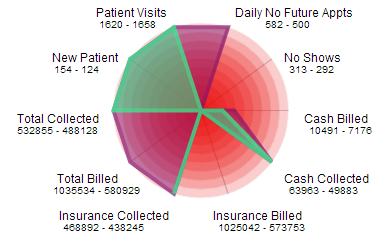
Do you worry about insurance claims payment delays? Peace of mind is hard to come by when you don’t have control over your chiropractic claims process since this affects your practice cash flow negatively. If you cannot track and predict your cash flow easily your business is doomed to die. To make matters worse, you drive away patients when you are stressed out, which further hinders the growth of your chiropractic clinic. Ultimately, you cannot achieve any long-term profitability without sufficient growth. Since seeing patients is your priority, you can’t make time to micromanage each chiropractic billing aspect. Addressing the large amount of failing or rejected claims is virtually impossible with limited resources. Nevertheless, you need to follow up on your chiropractic claims to avoid reduced cash flow for your practice. Inconsistent and ineffective chiropractic billing performance can have many culprits including incompetent or untrained staff. But no one can adequately keep track and follow up on all underpaid and denied claims without effective chiropractic software. However, not correcting these claims can affect the entire practice negatively since they will be forgotten and as such increase the percentage of your AR past 120 days. In fact, you need to track your active claims backlog in order to evaluate your chiropractic billing performance and AR. Managing a chiropractic office is a balancing act of multiple Key Performance Indicators (KPIs), though. It can be challenging to prioritize tasks as many chiropractors tackle easy problems first before they focus on more important matters. Instead of just putting out random fires you need to see the big picture consistently if you want to improve your claims workflow management and chiropractic billing performance. In order to do that you need a centralized organization of tasks and performance. Hence, it is vital to choose the right chiropractic software functionality. Naturally, your practice has a unique workflow that can only be supported by configurable and customizable chiropractic software. Yet, learning new chiropractic software can be a hassle many chiropractors would rather avoid. For that reason you should focus on ease of use for workflow management when evaluating possible chiropractic software solutions for your office. Moreover, all data should be displayed in an easy to digest way so you can complete a meaningful analysis on your own without wading through long and boring text reports. You should be able to look at multiple aspects of your practice at once, just like the snapshot Genesis’ Practice Health Monitor (a.k.a Radar) provides. To improve teamwork every member of your staff can also see this Radar chart on Genesis’ Home page every time they log on. You don’t need to waste time on compiling your practice stats, including claims status since data collection is automated. Furthermore, you and your staff can monitor trends to detect any problem areas before they cripple your practice performance. In order to track your practice performance over time and measure any improvements, you only need to customize your workflow KPIs. Genesis’ daily radar analysis and consistent follow ups in form of monthly Health Checks with your Coach further provide support to help you reach your goals.
Client Testimonial – Dr. Andy Vantreese

Dr. Andy Vantreese – Decatur,GA “A few years back I totally revamped my practice. I went from having 4 employees to running a practice all by myself. Quite the transition! It can be challenging trying to manage everything by yourself,” says Dr. Andy Vantreese. “The one tool that has been instrumental in making everything run smoothly is Billing Precision and Genesis Chiropractic Software. With Billing Precision I just schedule and treat my patients, do my notes and click Bill. From there everything else is taken care of. The system generates the claim and the billing team follows up. All I have to do it cash the checks and post co-pays. They post the insurance payments to my account and take care of everything else. The one ’employee’ I will never do without is Billing Precision!” Billing Precision offers a leading-edge chiropractic office profitability management solution. Its all-in-one Internet-based system includes accountable and transparent billing service, state-of-art touch-screen SOAP notes, advanced patient scheduling, and real-time monitoring for compliance and audit exposure. Billing Precision’s unique value stems from its ability to level the playing field with payers and get chiropractors paid in full and on time by capitalizing on modern Internet technology and billing network effect.
