
Chiropractic Billing | Cut your learning curve with In-Context Help Pages

Help is there for you. The old adage that time is money certainly holds true for busy chiropractors who want to improve their clinic’s profitability by implementing new chiropractic EHR software. Naturally, they want to avoid going through an uncomfortable adjustment period of learning the required software features, as much as they want to prevent massive changes in their practice management routine. The obvious solution consists of Genesis’ software training system that allows users to learn on-the-go with in-context help pages. By accessing the appropriate training material right where and when they need it (on the feature page), the users can tailor their personal learning curve to their specific needs and time availability rather than having to go through overwhelming and ineffective lessons. This learning/training strategy can help chiropractors and their staff members implement new practice management/billing software in the least amount of time necessary to prevent loss of revenue. On the other side of the coin, it allows Genesis to continuously improve its software to help clients manage their practices’ more efficiently without losing revenue on expensive 1-on-1 training. It goes without saying that basic knowledge of software features and functionality by each and every staff member at the chiropractic clinic is a must in order to use Genesis chiropractic software the way it was intended– as time-saving tool that speeds up documentation and chiropractic billing processes. Furthermore, software support staff would not be able to help resolve even the simplest user issues when clinic staff lacks this kind of technical foundation. Using the In-context Help Pages to learn more about each of Genesis’ features can be accomplished by clicking the [?] whenever you don’t know how to proceed. A help page will open that explains everything you need to know about using that particular feature within Genesis software platform. Many of the help pages also include a video that briefly explains what the tab or feature can do for you and how you can use it. Users can also comment, edit and rate each help page to ensure that the power of Genesis’ network effect is passed on to every member in the form of shared knowledge. Simply click the “Edit” button on the left and type in your user tips following the guidelines that will be loaded onto the help page. For detailed directions on how to edit a help page, click the [?] within the help page on the right side to load a tutorial.
Select the right metrics to improve your clinic’s billing performance

How often do you rely on your intuition when selecting a Key Performance Indicator (KPI) for your chiropractic clinic to track? Have you ever avoided hiring a person who did not “look the part?” When it comes to practice management and chiropractic billing, looks might have nothing to do with the statistics that reliably predict performance. Most chiropractic clinic owners and office managers know that good management and performance improvement require measurement. “We can’t manage what we can’t measure” is a well-known adage. But measurement of one KPI does not always result in accomplishing your goals. If you make such a mistake once, you experience disappointment. If you repeat it several times, you get frustrated. Repeat your frustration enough times, and you will grow anxious about making decisions in the future. Anxiety can create feelings of worry, uneasiness, and dread. An indecisive chiropractic practice owner or practice manager is a poor manager. A vicious cycle gets created causing you to fail as a practice owner or manager and experience frustration and anxiety about your personal performance. A recent article in Harvard Business Review (M. Mauboussin, “The True Measures of Success,” October 2012, pp. 46-56) identified three cognitive biases that impede practice owner’s intuition and skew practice management decisions: Overconfidence Availability Status quo Overconfidence Our deep confidence in our own judgement is often at odds with reality. For instance, most people regard themselves as better-than-average drivers. This tendency readily extends to practice management, where a chiropractic clinic owner relies exclusively on charges for a chiropractic billing success metric. While a downward trend of charges may be indicative of a problem with shrinking patient visits or a broken charge submission process to insurance companies, its growth does not necessarily result in total revenues growth. Availability We often overestimate the importance of examples that are easily available, that are at the top of our minds, for instance when they are frequently repeated or they are most recent. In the chiropractic billing industry, the three most recently unpaid claims by an insurance company do not necessarily indicate that this insurance company has changed its policy, or that the chiropractic biller in your office has grown negligent with her duties. Status Quo Chiropractic practice managers prefer staying the course rather than facing the risks associated with change. This bias is in part a result of risk avoidance, a fear of loss even in the face of a bigger gain. It makes it difficult for a chiropractic practice owner to adjust the KPIs in a changing environment, caused by new insurance payment policies or sweeping changes like Obamacare. It also makes it difficult for the practice owner to shift his focus from acquiring new patients to better serving the existing clients, once the practice has achieved a critical mass and is able to start growing based on patient referrals. Which one of these do you think you could be guilty of? Please share your views and experiences in the comment box below.
Control Your Claim Flow Visually Using Radar Software
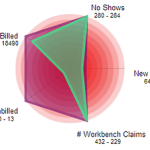
Do you worry about insurance claims payment delays? Lack of control over your chiropractic claims process causes inconsistent cash flow for your practice. If you cannot track and predict your cash flow easily you will have a hard time making your business profitable. You might even drive away patients when you are stressed out, which further hinders the growth of your chiropractic clinic. Ultimately, you cannot achieve any long-term profitability without sufficient growth. Since seeing patients is your priority, you can’t make time to micromanage each chiropractic billing aspect. Addressing the large amount of failing or rejected claims is virtually impossible with limited resources. Nevertheless, you need to follow up on your chiropractic claims to avoid reduced cash flow. Inconsistent and ineffective chiropractic billing performance can have many culprits including incompetent or untrained staff. But no one can adequately keep track and follow up on all underpaid and denied claims without effective chiropractic software. Not correcting these claims causes payment delays and can increase the percentage of your AR past 120 days. That’s why you need to track your active claims backlog and evaluate your chiropractic billing performance. Managing a chiropractic office is a balancing act of multiple Key Performance Indicators (KPIs), though. It can be challenging to prioritize tasks as many chiropractors tackle easy problems first before they focus on more complex matters. You need to keep your eyes on the big picture if you want to improve your claims workflow management and chiropractic billing performance. To accomplish this you need a centralized organization of tasks and performance. It is important to choose the right chiropractic software functionality. You should be able to look at multiple aspects of your practice at once, just like the snapshot Genesis’ Practice Health Monitor (a.k.a Radar) provides. To improve teamwork every member of your staff can also see this Radar chart on Genesis’ Home page every time they log on. You don’t need to waste time on compiling your practice stats, including claims status since data collection is automated. Furthermore, you and your staff can monitor trends to detect any problem areas before they cripple your practice performance. You can track your practice performance over time and measure any improvements with Genesis’ radar. But first you need to customize your workflow KPIs. Your Practice Success Coach then configures your radar to help you reach your goals.
Control Claim Flow Visually Using Radar Software
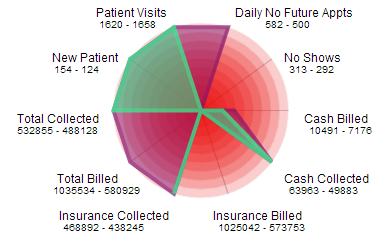
Do you worry about insurance claims payment delays? Peace of mind is hard to come by when you don’t have control over your chiropractic claims process since this affects your practice cash flow negatively. If you cannot track and predict your cash flow easily your business is doomed to die. To make matters worse, you drive away patients when you are stressed out, which further hinders the growth of your chiropractic clinic. Ultimately, you cannot achieve any long-term profitability without sufficient growth. Since seeing patients is your priority, you can’t make time to micromanage each chiropractic billing aspect. Addressing the large amount of failing or rejected claims is virtually impossible with limited resources. Nevertheless, you need to follow up on your chiropractic claims to avoid reduced cash flow for your practice. Inconsistent and ineffective chiropractic billing performance can have many culprits including incompetent or untrained staff. But no one can adequately keep track and follow up on all underpaid and denied claims without effective chiropractic software. However, not correcting these claims can affect the entire practice negatively since they will be forgotten and as such increase the percentage of your AR past 120 days. In fact, you need to track your active claims backlog in order to evaluate your chiropractic billing performance and AR. Managing a chiropractic office is a balancing act of multiple Key Performance Indicators (KPIs), though. It can be challenging to prioritize tasks as many chiropractors tackle easy problems first before they focus on more important matters. Instead of just putting out random fires you need to see the big picture consistently if you want to improve your claims workflow management and chiropractic billing performance. In order to do that you need a centralized organization of tasks and performance. Hence, it is vital to choose the right chiropractic software functionality. Naturally, your practice has a unique workflow that can only be supported by configurable and customizable chiropractic software. Yet, learning new chiropractic software can be a hassle many chiropractors would rather avoid. For that reason you should focus on ease of use for workflow management when evaluating possible chiropractic software solutions for your office. Moreover, all data should be displayed in an easy to digest way so you can complete a meaningful analysis on your own without wading through long and boring text reports. You should be able to look at multiple aspects of your practice at once, just like the snapshot Genesis’ Practice Health Monitor (a.k.a Radar) provides. To improve teamwork every member of your staff can also see this Radar chart on Genesis’ Home page every time they log on. You don’t need to waste time on compiling your practice stats, including claims status since data collection is automated. Furthermore, you and your staff can monitor trends to detect any problem areas before they cripple your practice performance. In order to track your practice performance over time and measure any improvements, you only need to customize your workflow KPIs. Genesis’ daily radar analysis and consistent follow ups in form of monthly Health Checks with your Coach further provide support to help you reach your goals.
