Do you reconcile your collections monthly?

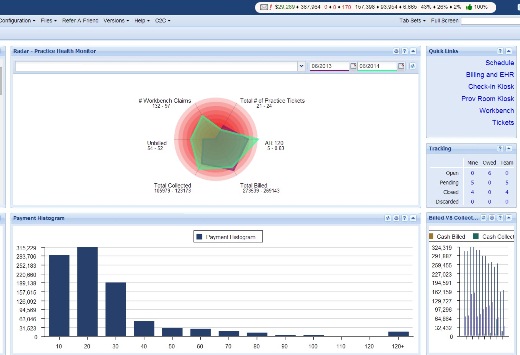
When your practice receives payments by cash, credit card or checks, how do you reconcile your practice with your bank account every month? To reconcile your bank account with the collections you receive at your practice is something they teach in business school, but not in Chiropractic School. Co-payments are being taken from your patients every day but checks from insurance companies come in by mail, weeks after the date of service. How do you keep track of everything and everybody? How do you know the money showing in your billing software is actually arriving in your bank account? The Genesis Chiropractic Billing Software can eliminate this memory management with several built-in tools to reconcile your finances. Your Accountant will appreciate these tools because they’re very helpful to number crunchers and bean counters. Learn how with the free webinar that can be viewed right on this page. Read the Transcript: Jason: All right, thanks for joining today, I appreciate it. And looks like we’ve got most of the people that we were waiting for to log back in and actually allow us to get started today. We had a little bit of a technical difficulty. I’m Jason Barnes, and with me is Jessica Pancoast. Today our topic of conversation, we realize is not necessarily the…can I just use the term “the sexiest of topics” when it comes to provider interest, but it’s one of those nuts and bolts that you don’t want to put your car back together and have left over wondering if you actually needed this for the car to operate. Today we’re talking about monthly reconciliation. And this really has two definitions. When we actually post insurance money into the system, or even patient money into the system, and it doesn’t make it to your bank account, I…not to patronize anyone, but that doesn’t do you much good, does it? It can look really, really nice that you’ve got high collections that are represented here in Vericle, but unless they actually translate into funds that you and your practice can use, we realize that all together, this is not useful for you. So today, we’re actually gonna talk about that process that we urge, and would really beg everyone to do, if we could, to actually reconcile what we’re posting in Vericle versus what actually hits your bank account. And there are some nuances, but today we’re gonna highlight those tools that we utilize to do that. And to start, you can see here that I have zoomed in quite a bit on what we call our dashboard. And you can kind of see here I’ll zoom out. In the upper right-hand corner, I’ll zoom back in here that you can see, and I’m overemphasizing this dashboard. This dashboard is what we’d like to think is a tool that every practice owner or office manager could use to see where they’re at, you know, during the month. And if you look at this, that first number in green, the $27,000 number, represents insurance collections month to date. As you look at that number, and then if you were to log in to your bank account website and check that out, you wanna make sure that the discrepancy between the two doesn’t exist, but you also shouldn’t be too surprised if they don’t match. And today, we wanna go over why that is. Why would we expect there to be one number in Vericle, and perhaps another number in your bank account reflection? So today we’re gonna focus on that, and to get us back to basics here, we’re gonna switch over and we’re actually gonna start talking about the two tools that you’re gonna use to get there. Now, you’ll notice that one of these tools is the same as a tool that we recommended last week to actually perform some of your daily or more weekly reconciliation steps, which is your credit cards, your point of sale, anything that you’re entering into the system is gonna have a payment type associated with it, and we’re gonna use this set of tools in order to make sure that something posted in the system is actually in your bank account. So the two reports that we’re going to show you today, probably are…reports is somewhat of a misnomer, in this case, Jess? Jessica: Yeah, reports usually just give you information and that’s it, but [inaudible 00:03:35] you actually do something with. Jason: Yeah, it’s a tool that can report information back to you, but really, it’s only useful if you’re using it as an input and a place to store information that you’ve confirmed is in your bank account, or, conversely, we have posted and isn’t in your bank account. So, the Check and Cash report is one, and the Monthly Invoice is the other. First things first, how do you get to them? Under Reports, you’re gonna head to your Reconciliation dropdown. This Reconciliation dropdown offers a lot of different tools for you to utilize. In this particular case, we are recommending these two tools, the Monthly Invoice right here, and your Check and Cash report, as your two monthly tools to make sure that all the money that’s posted within Vericle is actually in your bank account. Let’s get out of those. So this monthly invoice, you’ll notice here first, going over the nuts and bolts of it, is that you have some options. The first thing is is you can print this. You can refresh it, you know, if there’s a need to, but this other portion is you can actually export this to an Excel file, that Csv, the comma separated value line, if you were to actually access that, will put it in a format that will allow you to copy and paste this easily into Excel and OpenOffice, a LibreOffice, something along those lines. But, you’ll notice here that you have the month collected. Today happens to be April 5 of 2016. You
Do you reconcile your collections daily?

When your practice receives payments by cash, credit card or checks, do you have a way to reconcile your practice with your bank account? Reconciling your bank account with the collections you receive at your practice is something they teach in business school, but not in Chiro School. Co-payments are being taken from your patients every day but checks from insurance companies come in by mail, weeks after the date of service. How do you keep track of everything and everybody? The Genesis Chiropractic Billing Software can eliminate this memory management with several built-in tools to reconcile your finances. Learn how with the free webinar that can be viewed right on this page. Read the Transcript: Jason: All right we’re gonna get started here. We’re just going to type out the message one more time to the people and then we’ll get going. And I’m grateful as always to have Jessica Pancoast, head of our health [inaudible 00:00:12] training team here with me. My name is Jason Barnes, and today we’re actually talking about something relevant to every single practice out there. Each day you’re seeing patients and there are all sorts of things that you wanna track and make sure that it went well, you know, how many patients were checked in versus checked out, how much money was brought in checks, cash or maybe even in patient payments versus insurance payments. You wanna make sure that, you know, there wasn’t something that went really off the rails for that practice…for your practice that day. And today, we’re gonna talk about how to reconcile at the end of the day to make sure you’re tracking all of the things that are important to you, number one. And number two, how to help your staff gain clarity on what their job and what their role is so at the end of the day when they come to report to you or they’re able to leave the practice for the day, they know that they’ve got everything done that they were supposed to. And that clarity really leads to ownership and in our experience where we see that front desk person or the office manager really has an understanding of how that practice is supposed to run, and what’s supposed to happen at the end of the day to make sure that all money was collected and all patients got taken care of, then they typically feel much more vested in the success of the practice. So, that’s the subject matter for today and that’s how we’re gonna go about tackling this. Two, we’re gonna divide this into a couple of different categories and we’re gonna start out with money. Money is just never a bad place to start out with, right? So one of the simpler things that each practice expects to be done every single day is, patients walk through the door, they’re paying copayments, coinsurance, deductibles and deductible season is rapidly coming to an end, but I still see it happening. And all of that money that came through the door, in addition to any paper checks or even electronic trust funds transfer, [inaudible 00:02:21] for the day, how do we make sure that all of the things that get posted in the system in Vericle are actually, you know, getting to the bank account? So we’re going to start out with how to we’re gonna actually reconcile those two things. So just one little recommendation as far as where should they go and what should they look at first if they’re going to try and reconcile how much money came into the practice versus what they’re actually gonna deposit for that day? Jessica: Well, there is a number of different reports in our system. What I usually recommend for reconciling the cash and the paper checks that they got from their patient is actually in the checking cash report. It breaks it down…the cash, of course, is all on together and nothing specifically add in a random code in the check number when they’re adding it on the patient account. But the check in cash report will break it down by each check number, so it’s a lot easier to match it up check number by check number. And that way as something’s entered in the system, they’re able…and can’t find the check they know exactly what check they’re missing and exactly which patient it’s from and vice versa. If they have a check and they can’t find it on that report, they know that that check was not entered. Jason: Oh, perfect. And we’ll show them that in just one second. But I’ve visited a lot of practices, and I’ve been there at the end of the day. I was in Vegas last year with a real high volume practice. You know, they had a couple of inboxes, right? And they had the drawer where they have the checks from the patients and the cash from the patient, you know, they have a credit card machine right then and there. Hopefully, they’re using an integrated credit card solution where they’re able to run that report and see exactly, you know, what number was associated with credit card bookings for that day. But, in the drawer right next to it was backed up all the checks that they received from the insurance company. So, what you’re describing, though, wouldn’t just help them with the cash, right, that they received from patients. They will use that same process for any insurance checks that they got as well, right? Jessica: Yeah, so any insurance check that they got, if they are using one of our billing teams, they’ll send over those BOPs [SP], the team will post them and then they’d be able to match it again on that same exact report. If they are posting those checks themselves, it’s just the same as posting patient payment so they’d be able to verify it right away. Jason: Thanks, nice. All right.
How to Detect Insurance Underpayments

How can you tell if your Chiropractic Practice is being paid in full and on time by insurance companies? How can you tell if there’s an underpayment? Underpayments by Insurance Companies for the services that you render is a constant problem that you need to pay attention to. The Genesis Chiropractic billing software can detect insurance company underpayments and then you’ll know the details you need to address the situation. The elimination of insurance industry underpayments is a challenge because their goal is to not pay for anything until they absolutely have to. Their next tactic is to underpay and hope that you don’t catch on. They also try to delay your payments until you forget about it, and they typically take 120 days to get around to your payments. Our built-in tool will help you to detect and then to fight underpayments. Learn more with the free webinar that can be viewed right on this page. Read the Transcript: Jason: Thank you for everyone who joined us today and we’re gonna get rolling with our topic today. We touched on this topic really a few months ago, but we’re coming back to it, on how to manage collections in your office, very specifically, with measuring collections. There are two ways that we recommend as best practices. I’m not sure there is a third or fourth way to measure collections. Number one is, that all your visits get paid, and number two is, that they get paid the right amount. So today we’re actually focusing on that second portion of, “How do you know if your visits got paid the right amount?” So that will be our topic of discussion and we’re going to make some disclaimers here at the beginning. Is the right amount is specific when it comes to all the insurance companies that you’re in network with, and a little more of the guesstimate, when we’re talking about all of the pairs that are out of network. So we’re gonna go through, to the best of our ability, our options. But if you know a number that you should be getting paid for an insurance company, we’re gonna talk about how you can make sure that we are going to, number one, identify an underpayment. Number two, create workflow that will assign that underpayment to a specific person. And then number three, make sure you can follow up on it and know that you got paid the right amount. So practices are constantly concerned and worried about whether or not their collections are what they’re supposed to be. And it’s a challenge to try and come up with some formula, or algorithm to make sure you got that. So I wanna talk about, first of all, measuring collections. And then, you know, second, whether or not you guys can utilize the tools that we’re talking about to measure your underpayments or potential underpayments. So, collections, when we are talking about a practice and you look at a number in the upper right-hand corner here. And I’ll make it slightly bigger, and now we can use a few of our tools here to help annotate this. You know you’ve got collections… Jessica: Oops, I’m gonna select the color. Jason: You’re looking at, you know, the theory up here of $27,000 that you’re going to get paid, you know, in this month. How do you know that’s the right number? Well, each and every time that you look at that, you have to be saying to yourself, “Could I be getting more?” Every doctor I talk to thinks, or practice owner thinks they could be getting more. If all of your business have been paid and you check out that every single one of your date of service has had a payment posted to it. The next laudable question is, “How do I know that, that got paid the right amount?” Oh, how do I get rid of that? Jessica: Go to top first. Jason: Back to the top, perfect. And, today, we’re gonna bring you over to a couple of other accounts, and we’re gonna show you two reports that will work and help you understand, the first is your billing staff’s report. Your billing statistics report will help you run some trend analysis. And what I’ve done here is I’ve opened up our billing statistics report under billing analytics, billing steps. And the first thing that I’ve done is selected a date range. For this particular report, I selected all the way from January 1st to December 31st of 2015. So looking at the entire calendar year. And there is a lot of useful information that comes in the billing statistics report. Not every single column or piece of information will be something you wanna look at each time. But I’ve selected two metrics to marry together for this particular report. You’ll notice that I’ve sorted this into a month over month range, as I’m doing month of service. So what this means is, all of the dates of service that happened in that particular month. So I don’t care if you billed it out late, you could have billed a January date of service in April, but it would still be counted here for the month of service of January. And then I chose CPT codes, because…any of you providers that are in network with an insurance company, your contractual agreements will be either paid by visit or paid by CPT code. Here we’re focusing on paid by CPT code. And we can see here that you’re going to have a total number of claims of 567, you know, $50,960 billed out. But more importantly, you can see how much is, on average, paid by charge for each one of those months, for the CPT code of 9711O. And you can see here that it’s not a consistent number, month over month. All right? So what courses this fluctuation? Obviously there are balances left
Fortis Payment Systems is Integrated with Genesis.

Use Fortis Payment Systems to process credit card payments in real time online, not with a slow telephone terminal. Fortis Payment Systems is Integrated within Genesis Chiropractic Software. You can charge a patient’s card from within their account and you can charge their card easily from the Point of Sale screen as well. The payments can be tagged separately and they’re automatically posted to the patient’s account. Fortis will handle all of your card charging needs securely and they will handle your PCI Compliance as well. That’s very important. Be sure that you absolutely do not store any patient credit card numbers in your office or you could have a PCI compliance violation. View this webinar to see other features and to see how it works. Learn more with the free webinar that can be viewed right on this page. Read the transcript: Jessica: All right. Well, let’s get started. Again, my name is Jessica Pancoast and I run our training desk and help desk. Today, we are concentrating on third party companies, and today it is Fortis and we have Jonathan McAlees from Fortis to help us out with that. Welcome, Jonathan. Jonathan: Thanks so much for having me. So, we’ll talk a little bit about the integration that we have and I’m not sure, do we have control yet, Jessica? Jessica: I did promote you to a presenter. You should be able to download the… Jonathan: Okay, perfect. Yeah, okay. Here we go. I’ll start sharing my screen. All right, can you see my screen now? Jessica: Yes. Jonathan: Perfect, okay. So, I’ll give you guys a little bit of background into Fortis real quick. So, Fortis is a merchant services company, so we do credit card processing. We specialize in that. We specialize in high-end niche verticals. So, what that means is we aren’t a processing company that is built for everyone. We go into very niche verticals and we specialize in that. And so, one of those verticals that we’re in is obviously the EHR kind of chiropractic, PT, medical background. And so, what we did was we built a specific gateway geared for specifically what you guys are doing. So, what we found was a lot of the stuff that was out there was built for everyone, and it’s built for these web developers and it’s not really built for an office to take payments for their patients. And so, when we met up with Vericle we were able to integrate, and they have this great integration that allows you to take one-time or, you know, store credit cards or bank accounts on file, as well as set up reoccurring payments if you need that. And so, you know, as the market changes and you guys deal with EMV, we wanna make sure that you’re compliant because one of the things that happens is offices don’t realize all the compliance that they’re under. So, lucky you, as an office, not only are you under HIPAA compliance but you are also under PCI compliance by the fact that you take credit card payments. And so, we wanna make sure that you’re compliant and make sure that you’re following the regulations, and we want that to happen on our side, not your side. So, we allow the software to handle all of your PCI compliance for you. One of the things that we see within offices is they do things like they write down credit card numbers. And that’s a big, big no-no in our space. Most offices don’t realize that you can get fined up to $5,000 per credit card that you have written down. So, this is not something you wanna do. It could bankrupt an office if you have a hundred or a couple hundred cards written down and you are breached like that. So, we wanna make sure that you’re compliant, that you’re not doing that, and the other thing is there’s easier ways to do that. So, we’re gonna show you a little bit of that today, how the integration works with Vericle, and how it seamlessly integrates and allows your payments to auto-post back. So, as you can see here, I am right in the Vericle system. I’ve got John Smith, my patient, selected. To access Fortis, all you have to do is click more and then Fortis. You can see we haven’t left Vericle, so we’re still in Vericle but we go right from the patient’s profile in Vericle to their profile within Fortis. Now, from within here, you can do anything you need to on the payment side. So, if you wanna run a one-time transaction, a one-time swipe, you can just click the charge contact button, swipe a card with the little $14 USB swiper from amazon and then your transaction is done. It’s just as if you were running a terminal, except this terminal is now online. Well, we kind of like to say, and we do have terminals and some offices like them, but we don’t often recommend them. Because think of it as a flip phone. A terminal is like a flip phone and this system is like an iPhone. So, you’d really, really be wasting out if the only thing you used on your iPhone feature was making phone calls and text messages. There’s a lot of other things that you can do. Well, that’s kind of similar here. So, we don’t want you just stuck only being able to do one or two things on a terminal. We have a full terminal online. So, you can come in here and swipe payments just like I showed you there. The other thing you can do, and this is really where we start to help save you time and money, is you can store credit cards or bank accounts in our system. We do this all securely, through a system or process called tokenization. If you’re not familiar with tokenization, essentially, what we are