
ClinicMind External NewsLetter

ClinicMind has acquired Affinity Billing to expand its revenue cycle management (RCM) services. Monthly updates include scheduler customization, waiting list management, and mobile EHR enhancements. ClinicMind updates faxing service pricing for better quality. The patient portal, CareToMe, is rebranded as MyClinicMind. Affinity Billing clients will now receive invoices from ClinicMind.
Monthly New Features Highlights – January 2023
New Features Available on Production Servers! Patient Messages Mailbox This new feature allows the practice the ability to be more transparent with patient communications internally as well as provide better patient experiences when interacting with the clinician outside the clinic setting. Practices are able to set up more general mailboxes such as for their billing department, scheduling questions, and any communications that may not be provider specific. This gives the practice more flexibility on how patients can communicate with them through messages. Automatic Document Publishing A new feature allows the practice to set up documents that can be automatically published to the patient’s portal based on their appointment. Patient Phone Numbers to Barcodes A new feature that automatically adds the patient’s phone number as a barcode. Patient Statements Option to display Date of Birth A new feature that provides an option to display the patient’s date of birth on their statements. XDocs Macro Management A new feature that allows for macros to be renamed and managed without opening an existing document. Flexnote Updates Updated FlexNote where Salted Values are highlighted for visibility and automatically de-highlighted once the values are updated. New option to easily add addendums within FlexNote. Click here for detailed information on new features on app servers
Monthly New Features Highlights – December 2022
New Features Available on Production Servers! Patient Responsibility Estimator A new feature that allows the practice to view patient responsibility. Billing Widget Update The Billing Widget now has the new option for individual users to set favorites for their modifiers similar to what we do with ICD/CPT Codes. Auto Check-out by Appointment Type A New feature that allows users to automatically check out patients based on appointment type. Schedule Alerts Updated Alerts for patient balances that go over or under a set threshold. Documentation Updates FlexNote now has a set of new features including creating tasks within a note, highlighting for unreviewed fields, and adding an addendum to completed notes. XDocs now has additional logging features. Click here for detailed information on new features on app servers Optimizations Patient Portal Optimizations A new setting for the preferred patient portal version. Patient portal logs now include portal version, portal link, and delivery method used. Patients can now view their medications in the CareToMe patient portal. Appointment Type Summary Report now includes a unique patient count.
The New 988 Mental Health Crisis Line
The 988 Crisis Lifeline, launched on July 1, 2022, is a suicide prevention network connecting over 200 crisis call centers across the U.S. It provides immediate access to mental health professionals for individuals in crisis, offering an alternative to involving police and first responders in mental health situations. While promising, concerns include the potential dispatch of police officers in emergencies, urging the need for continued improvements to the crisis response system.
Informed Consent With ChiroSecure
“Your expectations shape your reality. They can change your life, emotionally and physically. You need to be extra careful about (and aware of) the expectations you harbor as the wrong ones make life unnecessarily difficult.” – Travis Bradberry So what are the three questions patients want answers to once in the door? Do you know what is wrong with me? Do you think you can help me? Have you ever helped anyone else with the same problem? As far as expectations, they only have one. YOU WILL FIX THEM! What about your expectations? When a patient comes to your office what do you expect? They will sign up for your care program. They will understand the value of regular ongoing chiropractic care. They will make all their appointments. They will pay you for your services. They will get better if they follow your recommendations. They will refer their friends and family members. Do you see the problem here? They enter your office with one expectation, and that expectation is not even on your list. Good relationships require both parties have the same expectations, and the ones that don’t do not last very long and usually end painfully (forgive the pun here). If you are going to have a successful risk free relationship with your patients, the first thing you need to do is change their expectations so that theirs and yours are the same? First, let’s look at the things you are most likely already doing that unfortunately do not change the patient’s expectations. Patient Case History Patient Consultation Patient Examination Report of Findings Care Recommendations Care Plan Financial Discussions All those things, even if the patient completely understands your report of findings and care plan recommendations, do not change their expectations. If they did, every patient would become a life-long patient and follow-through with care. How many of your patients follow through with care? With the wrong expectations, if the patient gets better they leave; if they don’t get better right away or may even get a little worse they leave. As a result, most doctors are on a constant quest for new patients. There is only one thing that changes the patient’s expectations. Sitting down and talking about their expectations. Asking them what their expectations are and explaining to them what they should be and why. In our world of Risk Management, we call that Informed Consent. In your world of patient expectations, you should call it Informed Consent. Is the Informed Consent that you are using designed to create the right expectations? It should! Are you even using an Informed Consent? You should! Our good friends at ChiroSecure have provided a quick video on Informed Consent and exactly how you should use it. Check it out. Want to know more about ChiroSecure visit: https://www.chirosecure.com/more-chiropractors-choose-chirosecure/
Designed for Today’s Chiropractor
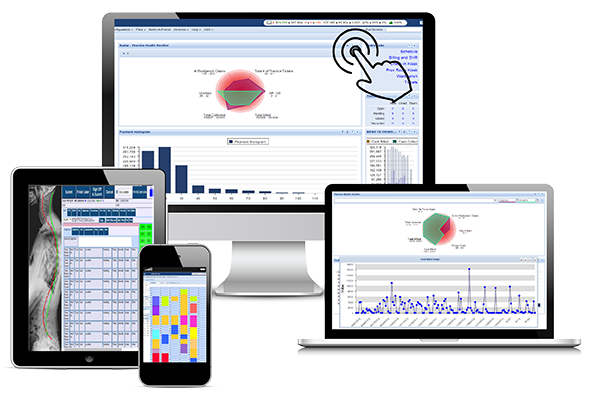
Genesis is The Software Designed Specifically for Today’s Chiropractor. Developed specifically for today’s fast-paced chiropractic office – rapid documentation, built-in compliance, and efficient billing are just a few of the features Genesis brings to today’s chiropractors. Being a chiropractor and running a successful practice is different today than in the past. If your practice décor is stuck in the 80’s, patients don’t want to be seen in your office. If you’re not up-to-date on the latest marketing techniques, you will have a hard time competing against more savvy practices. And, if you don’t use the latest in chiropractic software, you could be setting yourself up for failure. That’s why Genesis Chiropractic Software was designed specifically for today’s chiropractor. Here’s how… With Genesis, you get a complete practice management solution that allows you to integrate documentation, scheduling, billing, patient communication, and much more, allowing you to eliminate duplicate data entries and enter data once, saving time for you and your staff. The program also uses proprietary technology that automatically creates tasks so that you can correct issues without running detailed reports. Our software offers compliance monitoring systems that are built into one workflow and managed from the single program. Claims that need attention are immediately identified for your staff, and you are able to access the total number of tasks needed to maximize your collections, boost patient retention, and maintain compliance. Genesis Chiropractic Software is also cloud-based so there is never any software to install, update or maintain. And, since Genesis is compatible with both Mac and PC operating systems as well as mobile devices, including iPads you can access your practice data from any internet connected device. Genesis Chiropractic Software is cloud-based so there is never any software to install, update or maintain. Genesis gives you a mobile solution for your practice to help you get your notes done quickly, and allow you to see more patients. With Genesis, you are able to practice when and where you want. Genesis’ Billing department even provides billing services for buyers looking to outsource this task to an outside group, relieving the burden from you and your staff so that you can do what you do best – take care of patients. Since Genesis is ONC-certified and HIPAA compliant you also save time, avoid audits and get paid faster. Even better, whether you are just starting out or running a high volume practice, Genesis offers efficiencies to rev up your revenue. And, we have unique features, platforms and pricing that caters to your practice needs. Developed specifically for today’s fast-paced chiropractic office – rapid documentation, built-in compliance, and efficient billing are just a few of the features Genesis brings to today’s chiropractors. So, if you’re ready for a cost-effective and easy-to-use paperless system designed by chiropractors with a chiropractor’s specific EHR in mind, it’s time to make the move to Genesis Chiropractic Software. Call today to schedule your dream practice analysis and manage your entire practice with Genesis.
Video Feedback from the User Training
Genesis Chiropractic Software User Training was held at Next Level Coaching back on Sept. 15, 2017. These 3 DCs attended the user training session and they gave their honest assessment afterwards. The Genesis Patient Experience User Training Session went well. We partnered with Dr. Michael Buffington and Next Level Coaching and we created a unique opportunity to get more out of Genesis Chiropractic Software and Chiropractic Billing Service and also get motivated to crush it in practice on Monday morning! Participants learned how to create an amazing patient experience (Genesis Px) plus learned how to leverage Genesis’ unique Single Point Management technology, features, integrations, and automation. There was also an open Question and Answer period where questions were answered by the Founder and CEO of Genesis Chiropractic Software, Dr. Brian Capra and the COO Jason Barnes. In the video below, Dr. Ryan French actually quoted what Jason Barnes taught him, “Let’s stop feeling how we are in our office and let’s look at specific data that shows us exactly what we’re doing in our office, so that we can get past those feelings and get to the facts where we want to be.”
User Training at Next Level
Genesis Chiropractic Software User Training at Next Level Coaching Sept. 15, 2017 We are excited to announce our second of many Genesis Patient Experience User Training Sessions! We’ve partnered with Dr. Michael Buffington and Next Level Coaching to create a unique opportunity to get more out of Genesis and also get motivated to crush it in practice on Monday morning! Where: Sheraton Stonebriar, Frisco, TX Room: Warren Ballroom When: Friday Sept. 15th Time: 9AM – 1PM What we’ll cover: 9 – 9:30 AM Presentation for non-Genesis Users + refreshments 9:30 – 1PM – Genesis Training Creating an amazing patient experience (Genesis Px) leveraging Genesis’ unique Single Point Management technology, features, integrations, and automation. Open Question and Answer period. We will also be providing refreshments and snacks!
Customized Support
Genesis Support is Customized Just for You! Why Customer Support Matters Matter There is no doubt that the EHR software market is large, and it offers numerous options for doctors and their offices in the chiropractic field. Why do we think we offer the paramount software solution for today’s Chiropractor and their staff? Because we know to there is more to it than just providing a comprehensive EHR package. Several competitors are out there trying to duplicate many of our key features. While they might get close, we truly have something that separates us from the pack. Customer support is usually not something that sells products; most everyone buys features and benefits of the product being sold. Features like ONC certification, intuitive SOAP and EHR documentation, and other aspects of leading edge software are critical to your success. But when you buy EHR software, you need to consider how easy it is to get assistance if and when you need it. “Their customer service and training have blown me away!” ~ Dr. Gary Dillon The amount of guidance needed varies from office to office. Some doctors and their staff take up the challenge and dive right into the program, utilizing every manual and tutorial we offer to get the most out of our program as quickly as possible. Others who may not be so gung- ho, like a newly graduated doctor or those who’re looking to make a change after many years of working with a competitor’s program may need additional help. This is where we shine. Our support is customized just for your needs. At Genesis, we know the challenges you face as a doctor. We offer initial live support for our new clients as a way to bridge the gap and get you comfortable with your EHR office solution. And while we can say this, we think it’s better to read what some of our our current clients think about what we provide AFTER the sale. Diane Gottlieb works at Wheaton Family Chiropractic in Illinois and has this to say: “I am the CA in the office and I rely on tech support to help me out when I run into difficulty. They are easy to contact and extremely helpful, not to mention patient.” Dr. Gary Dillon of Ashland, Kentucky said, “Their customer service and training have blown me away! They are really here to help you versus our old EHR and billing that seemed like they were only there to collect my money for themselves.” Finally, an Office Manager at Beard Family Chiropractic named Justin Chambliss has this to say: “If I ever have any issues or I need help I can get someone to help in a timely manner, usually within an hour if I send a message.” You have many choices when it comes to EHR software solutions for you and your office. After our Initial Practice Evaluation, we can show you how our solution can benefit you by giving you more control over your patient flow, as well as letting you greatly increase your cashflow!
How Many Office Tasks Does a New Patient Generate?

When a new patient comes to your Chiropractic Practice, how many steps must your Front Desk person take to create a new patient account? Typically, a new patient comes in to fill out forms and then your Staff has to remember to copy their driver’s license and their insurance card. Next, the patient’s data has to be typed into a computer. Co-payments also have to be collected and future appointments need to be scheduled. Are all of these tasks being completed for every patient? How do you know? The Genesis Chiropractic Software can eliminate this memory management with a tool we call a Task Checklist. All of the steps are written down and turned into tasks that can be automatically assigned to your staff members. The Task Checklist is launched with every new patient and your staff will know exactly what to do without being told. The Practice Owner will be able to see at a glance if every task was done for every patient, which ensures a consistent patient experience in your office. It also gives you and your staff peace-of-mind knowing everything is done at the end of the day. Learn more with the free webinar that can be viewed right on this page. Read the transcript: Jason: Well, good afternoon everyone and welcome. Jason Barnes and Jessica Pancoast here for this week’s webinar, and this week we’re actually talking about all of those tasks that have to be done for every patient or for every day or for every month in your practice and remembering to figure out what those tasks are and making sure that they get opened and then done. Today we’re gonna talk about how we can more easily manage all those repeatable things that need to be done in your practice. So we’re going to…I think the term Jess, is reintroduce, reintroduce the task checklist because, you know, if you haven’t been reading all the release notes, we’ve got some new things which I think are kind of exciting, different ways we can manage these. So that’s what we’re talking about. We’ll give it another minute or two before we get started. Okay, let’s get started. I’ll do another brief intro. Jessica Pancoast is the head of our help desk in our training team. My name is Jason Barnes. Today we’re talking about operations of a practice. Those things that need to be done for let’s just say every new patient or every day you want your staff to do an end of day reconciliation, and there are steps that they have to remember to do, make sure they tally up the cash, make sure they tally up the…kind of previewing for next week, Jess…tally up all of the insurance payments and make sure we know what’s going in the bank account versus what’s posted in the system. Maybe you want to do inventory control on, you know, a certain time of the month, whatever it is. As a practice owner or an office manager, you wanna make sure that those tasks get done but sometimes just remembering to assign them to people can be a task in and of themselves. So today we’re going to talk about how we can, number one, identify what work in your office needs to be done on a repeated basis. Number two, figure out how we can create those items in a list somewhere. Number three, figure out how we can best execute those on a regular basis so that you as the practice owner or administrator can keep track of the fact that this work actually got done. The concept of what we’re gonna call a task checklist is not new. We used to call them ticket macros in our system, and Jessica just created or corrected me saying that they’ve been around for four years, not for three years. We’ve seen them more widely used in the last year or so by many of our practices. So, first of all, what exactly is a task? For anybody who’s not using our system which I believe most of the viewers end up being our users. They know what tasks are, uses are. But anyone who doesn’t know, a task is not an email. It’s not a notification that something happened. A task is an action item that needs to be done within [inaudible 00:03:12] by a certain individual. That task…and can you bring up a task work screen, Jess? Those tasks can range in varying spectrum from order more coffee cups to follow up on a no-show to get my credentialing done for Medicare. Any way you look at it, none of these tasks are created, you know, people ordering coffee cups is in no way on par with getting my credentialing done with Blue Cross Blue Shield. And so these tasks have a couple of things, and their anatomy is important. They have a priority associated with them, the critical tasks all the way down to low priority. And for us, we want everybody to understand that those priorities actually mean something. When we need something done, the people we assign it to, typically is not the only thing we’ve asked them to do, right? When I’m looking at an office manager role versus a front desk role, very different roles within an office. The front desk has to remember to do a lot of things though. Somebody checks in, how many things are they required to remember at that moment? Ensure they have an insurance card. Do they have a balance from a previous visit? Did they have their next visit showed up? I can keep going. How are they gonna remember to do all that? There are some old rock stars out there that do remember it every single time. But if you add to that saying “Order coffee cups,” or, you know, “Make sure that we get more vitamins in for this particular type,” that’s when you can start to throw people
