
Kickstart Your Chiropractic Practice
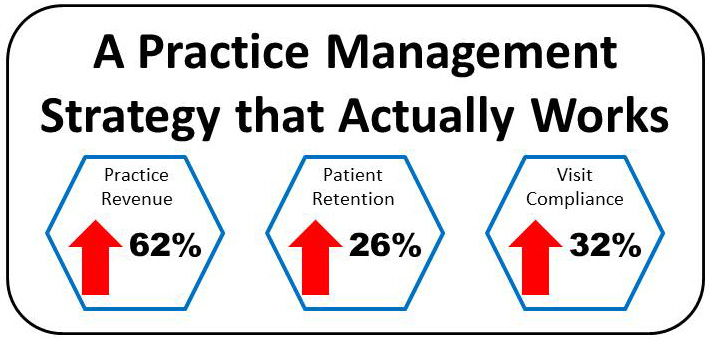
Too many times, your chiropractic practice can languish. You may be doing well but still have more room to grow or maybe you have been seeing a decline in the number of new patients or number of patient visits. You may even just be starting out and trying to figure out how to bring in new patients, pay the bills, and just keep the doors open. The key to overcoming these challenges is to take immediate action and there is no more powerful action you can take to kickstart your chiropractic practice than putting Genesis Chiropractic Software to work for you. In fact, you can power your entire practice with Genesis. Statistics show that new practices that use Genesis Chiropractic Software have proven increases in revenue, retention, and compliance. Even better, these are not small numbers. Practices using Genesis have seen a 32% increase in patient compliance, a 26% increase in patient retention, and a 62% increase in revenue. Genesis is a web-based practice management software that combines the tools and training you need to rapidly increase your professional growth. It combines an exclusive workflow, documentation, scheduling, and billing. Genesis Chiropractic Software is a practice management strategy that actually works. The software has been demonstrated to be a highly valuable and rewarding platform for startups. Whether you’re in the development phase or looking to start generating more patients, Genesis is something that can help you succeed online. The platform has added benefit by saving you and your staff time every day. The time you will spend in Genesis depends on how much of the solution your practice uses. However, the average daily note can be accomplished in under 15 seconds and under 2 clicks. Many visits require much less. This makes Genesis a powerful time management tool. Genesis Chiropractic Software is a practice management strategy that actually works. The Genesis billing platform is a vital component to the revenue increase practices experience when using the software. It is such a robust tool because: Over a dozen teams work for you round the clock to follow up on claims and ensure maximum clean claims with maximum reimbursement Auto-prioritization means the system decides what needs to be followed up on by over 20 MILLION different rules updated daily Real time updates to claim balances means statements are always current Patient questions are answered with a single click. No more sifting through pages and pages of data to find a simple claim update or balance owed Claims are submitted with the highest clean claims rate Fee schedules are reviewed multiple times a year to ensure maximum compliance and reimbursement Whether you are experiencing difficulties in your current practice, are starting a new one, or just want to take your practice to the next level and experience greater success, Genesis Chiropractic Software can help you. Developed by chiropractors, for chiropractors, it is by far the most powerful tool available, allowing chiropractic practices to increase patient retention, compliance, and revenue all in one platform.
Are You Able to Manage Your Practice at a Glance?
Running a chiropractic practice isn’t easy. As the owner and doctor, you have to wear many hats. You have to manage staff, provide patient care, keep up with the bills, and implement the marketing. If you are using an out-of-date practice management and EHR software, your job is even more difficult, having to memory manage all of your tasks or rely on report after report to keep your practice in check. Isn’t it about time that you took the guesswork out of practice management and were able to manage your practice at a glance? If you are using one of those outdated chiropractic software, it’s time to look for something better, something that puts you back in control of your office, brings your entire patient experience together, and makes practice management intuitive and efficient. Genesis Chiropractic software and practice management software is the best chiropractic software available today. With more than 2000 users, Genesis is also the easiest chiropractic practice management system to implement. I know the power of the Genesis system because I helped design it for my own practice. It is designed and built by chiropractors for chiropractors, integrating leading technology with easy-to-launch chiropractic practice management software system. Genesis is a chiropractic software platform that is affordable and powerful enough to help you automate your practice management and increase your practice profitability. With Genesis, you really can manage your practice at a glance. Genesis boils your entire day down into the number of tasks you have to complete to ensure that everything is done to make your practice successful, from patient care and billing to follow-up calls and patient education. Once the tasks are created, Genesis assigns them to the best possible staff member to complete each one. And, with the Genesis Ticket Manager console, you can easily check active and overdue tickets for each user and even interact with the tickets to determine how well each staff member is performing the tasks assigned to them – practice management at a glance. With Genesis, you can finally take the guesswork and memory management out of your practice. Genesis is designed to help you increase patient communication, reduce your patient no shows, automate your visit documentation, easily implement ICD-10 into your chiropractic practice, manage your inventory and more. This intuitive software streamlines your entire practice management, helping increase patient retention and generating more revenue and profits through a chiropractic practice management software system that actually works. The Genesis software platform works so well because it is built on top of a proprietary chiropractic workflow management architecture. This architecture is designed to automate the majority of your practice management tasks, starting with chiropractic billing. In addition, our advanced chiropractic workflow management version includes automated alerts and task generation. Genesis was designed from the ground up to eliminate the need for memory management, promote practice teamwork, and help manage patient communication and relationships. With Genesis, you can finally take the guesswork and memory management out of your practice because it’s about time you had the peace of mind that being able to manage your practice at a glance brings.
WebExercises is Integrated into Your Patient Accounts

How does your Chiropractic Practice recommend exercise routines to your Patients? Webexercises works. As a Chiropractor you know that patient exercise will greatly improve your patient outcomes. Patients get better faster with exercises but it’s a hassle to tell them which exercises, how many, how long, how to do them, etc. What do you do? Do you hand them a paper that’s been copied so many times that the letters are starting to be colored in? Shouldn’t there be a more efficient way to recommend exercises using technology? There is! Webexercises has been integrated into each of your patient’s accounts within Genesis Chiropractic Software. With a few clicks of your mouse, you can choose the patient’s problem and the appropriate exercises are automatically pulled-up to help the problem. Then you can email it directly to your patient from the same screen. How easy is that? Watch this Free 30 minute Webinar to find out more from Dr. David Cruz and to see exactly how it works. Learn how to use this tool to improve your patient outcomes and you might even impress them with the email exercises from your office. Enter your information and watch it now below. Read the transcript: Jason: All right then, it’s about four minutes past the hour so we’re gonna get started. I’ll introduce myself, Jason Barnes, Chief Operating Officer with Genesis Chiropractic Software. I’d like to thank everyone for joining us this afternoon. We do this pretty much every Tuesday so I know I see some familiar people who join us each week, so welcome. And for those people who might be joining us for the first time, excited to introduce a topic and a guest today. So a little bit of background information, I like to think we’re good at a lot of things here at Genesis, but we know we’re not good at everything. And so we listened to the suggestion of our providers and our providers have been asking us for tools that they can use to help talk to their patients, teach their patients, empower their patients. And well-informed patients, excited patients, ones who have better tools in their hands, we know stay with the practice longer and have a much higher tendency to refer their friends, family, colleagues, etc. And so today, I’m really excited to bring to you a response to a number of requests and something we know that will help you do just that with your patients, and that’s an integration between Genesis Chiropractic Software and WebExercises. And what I’m really excited about is all the work that’s going into this between our two organizations and how that work together is going to help you. So today we’re gonna find out what problems we’re gonna solve with how patients can take information that you want them to have for both clinical treatments as well as things they can do just to improve functional aspect to their lives. And to do that I need to introduce Dr. David Cruz who is the President and CEO of WebExercises. And not to mention that he actually is a chiropractor and actually ran his own practice successfully for a long, long time. He’s passionate about this topic, so I won’t do too much more in the way of introduction, but I want him to do all the speaking for his own merit because frankly, I’ve talked to him a few times now and he knows exactly what he’s doing and so I’m gonna introduce one of founders and President of WebExercises. David: Hey, thank you there. I appreciate that intro and really excited to be here and really excited to be working with Genesis and Vericle on the integration. A lot of work went in so we’re excited to get this going. As Jason was saying, I did practice for about 18 years. I had a sports medicine practice and the foundation of WebExercises really came at a point about 11, 12 years ago to where, how can I do a better job with regards to engaging patients, getting them to do active care? Because when you combine active care with chiropractic, there’s nothing better in the literature that is gonna show with regards to outcomes. But there’s always the challenge of there’s only so much time you have with regards to trying to get them the right exercises, reviewing the exercises. How do I connect with them, and how do I just reconnect with them? So that was really the impetus and that was the start of WebExercises that, again, I started the company about 11 years ago. So what I wanna do is just go through a brief PowerPoint just kind of highlighting some really I think important points with regards to exercise and chiropractic. And then really just taking you into the software and give you a demo and a feel of exactly what it is and how it can be utilized. Hey, Jason, we’re getting some feedback. I don’t know if that’s on your end? Jason: It’s gotta be me. I’m the only one who’s not muted, so I’ll mute myself. And I’ll make just make one announcement. If there’s any question that people have, we ask that you type them in. And we’ll answer them, and I’ll mute myself. And I apologize for that, Dave. We’ll get started. Dr. Cruz: No worries. So as I mentioned I wanna go through a couple slides just to kind of frame up what we’re gonna talk about with the demo and really kind of just dive straight into this great [SP] software integration to show you how it can improve your practice with regards to efficiency, even generate some revenue through active care, how to engage patients, and how to re-engage patients. So one thing I like to start with is just from a historical perspective. So often it’s thought of as chiropractic and exercise are two different things, and it’s more of a newer concept. But
How to Detect CPT Code Underpayments

If insurance companies underpay your practice for certain CPT codes, would you be able to look it up? CPT code Lookup: How would you find that out in your practice management software? Can you look back a year and see what you’ve been paid per CPT code? Our clients tell us that their previous software couldn’t look backwards as they needed it to, so they’re very excited that Genesis Chiropractic software can do that. It’s a tool called the Billing Statistics report and you can configure it to look up just about anything. (Within your own account of course!) Watch this Free Webinar to find out more and to see exactly how it works. Learn how to discover your underpayments and get paid what you deserve. Enter your information and watch it now. Read the transcript: Jason: Good afternoon everyone, it is just one minute past the hour, so we’re just gonna give it a couple of minutes before we get started. Jason Barnes here with Jessica Pancoast, and we’re going to talk today about attracting CPT codes and making sure that you guys are getting paid for visits we are looking to get paid, and so this is a big portion of app, but we’ve got a bunch of people in the web portion we all have and are doing to the audio portion so we’re gonna give this another minute or two. Thanks for your patience and we’ll get started here in a moment. In the meantime, if you have any questions, feel free to type them into the chat. Jessica: If you guys do not see the chat, it should be over on your left-hand side, there is a button up at the top that would say “show chat.” if you don’t see it, then you can turn it on. Jason: All right, perfect. Exactly another minute or two and we’ll get started. Jason: All right, we’re gonna get started. A whole bunch of more people joined, so I’ll go ahead and introduce myself. Jason Barnes, chief operations officer here, and I’m the head of our help desk and training team, and sitting right next to me, Jessica Pancoast. I must announce, Jessica is much tanner than she was a couple of weeks ago, due to some well-deserved vacation and a smile on her face, I think it’s going to be heard by all who are listening today. I know I’m truly enjoying spending time with her. But today we are actually talking about a pretty specific topic, and one would define the problem that we are looking to solve for a couple of our practices here, collections, per activity when it comes to certain doctors or whether or not certain payers, or reimbursing. Today, we’re actually going to start talking about procedure codes, CPT codes, and how we track their reimbursements. So, we’ve got a couple of tools we want to talk about and we’re gonna first head over to our demonstration account here and when you’re looking at collections from a regular base that there’s a lot of different ways of doing it. But I always tell people the radar chart and configuring that is one of your best ways of going about it, so you can see what your total billed is and you’re total collected, but what makes that up and when something’s lower than what you expected, there’s a number of ways to dig in, and sometimes, or all the time, for CPT codes reimbursements can be the difference. Whether or not you offer physical therapy on your office and there’s a sequestration law that you just aren’t aware of that is reducing CPT codes, you’re a network and you’re getting underpaid in a situation where CPT codes is simply being denied, it’s not covered, how do you keep your finger on the pulse of your claim reimbursements at a procedure code level. Today, we’re actually gonna talk about the tools to take a deeper x-ray or look into low collections versus CPT codes and whether or not you’re simply looking at your dashboard, and you see that $27,000 at this point of month is not okay or you head over to your, some of your reports and you wanna look at your month closure reports, and we’ll get to see history or the trends of how much you’re getting paid and keep in mind that I’m very zoomed in here for the sake of presentation, if this doesn’t look how it looks then your strain is totally… it should be expected, is what I’m saying. If you can click on your history tab here and get a history of what you’ve been paid, and what’s been adjusted or refunded. But if you do recognize a problem, where do you go? The first place we’re gonna tell you to go is head over to “Reports,” bill and the analytics and over here I’m gonna leave this entire drop down open is a number of ways of slicing and dicing the financials for your practice. Here, we’re gonna focus on the billings statistics reports, but first I’m gonna open your billing statistics configuration screen. Here is a list of data points that you as a practice owner or as a practice manager can take a look at, but I really want you to understand what each one means. You can create, customize or personalize even reports. Today, we’re gonna be looking at CPT codes and we’re gonna be looking at primary insurance, and you might even wanna be looking at rendering physicians. And so, you can create a report, it means CPT codes, rendering and your pair. You can save this report and it will be added to your list of selections when you actually go to open up your billing statistics report, but the question is, what data am I gonna look at, and why? Today we’re actually gonna dive into what data you actually want to look at. So out of all
Do You Have a Practice Management Strategy that Actually Works?
You spent years and probably hundreds of thousands of dollars getting through chiropractic school and opening your practice; yet, you may not be receiving a good return on your investment. You give every patient your best and you are doing your best to provide a good life for yourself and your family but it still may not be working if your practice management strategy isn’t working. Isn’t it about time that you had a practice management strategy that not only worked but could increase your practice revenue, patient retention, and visit compliance all while allowing you to provide the best possible care for your patients? I can tell you without a doubt, that the solution to your practice management strategy problems is Genesis Chiropractic Software. I developed this software for my own chiropractic practice and saw first-hand the incredible power of leveraging Fortune 500 level tools in my daily practice. Not only did my revenue increase but my patients were happier, more likely to continue care and my stress level went down because I was no longer managing by memory all of the hundreds of daily details involved in running a practice. Genesis Software is an all-in-one solution. Genesis Software is an all-in-one solution. It has all the tools that your practice needs in one easy to use platform. You can get the fastest documentation and the best patient experience in one place. This chiropractic software helps you to increase practice revenue by making sure you get paid in full and on time, giving you the tools to control your practice’s performance, and making it easy to maintain compliant chiropractic notes during your chiropractic billing process. It allows you to check eligibility, check outstanding balances, collect co-pays, and accept credit cards as well as automatically capture and submit claims in real time, avoiding days, weeks, and even months of lost processing time. Genesis’ exclusive design also lets you analyze chiropractic billing performance and focus on patient relationship building, a vital tool in the growth of your practice. Putting Genesis to work in your practice also helps you to increase patient retention by making it easy to follow up on no-shows, schedule and check-in patients, and configure reminder calls. It lets you focus on your patients, not on your documentation and gives you the chance to educate patients and improve patient compliance using software animations built-into your documentation Visit compliance is increased using Genesis too because the software makes it easy for patients to pay bills, schedule appointments, and stay committed to their care. Genesis also gives you automatic compliance alerts, notifying you instantly of potential compliance risks. This allows you to take immediate action to preserve that patient relationship. With the exclusive workflow built into Genesis, you don’t have to memory manage your practice anymore or search through report after report to make sure your practice is running optimally. Best of all, in my opinion, is that Genesis Software allows you to free yourself mentally and physically to focus on growing your dream chiropractic office. With the exclusive workflow built into Genesis, you don’t have to memory manage your practice anymore or search through report after report to make sure your practice is running optimally. Genesis takes the guesswork out of running a Chiropractic office and instead breaks everything down into real-time, usable numbers and tasks. If you are ready for a practice management strategy that actually works, you are ready for Genesis Increased practice revenue, patient retention, visit compliance and better patient care all in one platform, with the added bonus of peace of mind at the end of the day, knowing that your practice is not just good but the best it can be…It doesn’t get better than that.
With Genesis, Patient Retention is Automatic

The patient pool is something that constantly needs to be re-filled for many Chiropractors. It is a never-ending process of finding new patients to replace the ones who have left your practice. This creates a continuous area of work for you, as the doctor. You not only have to handle patient treatment, you are the staff and office manager, the record keeper, the financial manager, and the patient recruiter. Wouldn’t it be easier if once you had a patient, you had an automated system to keep that patient? Wouldn’t it be better if you had a simple way to make sure that every patient became an educated patient, who understood the value of maintenance care to ensure their optimal health? How much easier would your day-to-day practice management be if patient activities were automatic? One of the most valuable steps you can take in your practice is to automate your patient retention. When you are not constantly having to refill your patient pool, you practice can truly grow. The problem is that in many practices, patient retention is another activity that is memory managed and often forgotten until you are trying to discover the reason that you have lost yet another patient. Let’s take a quick look at what activities are necessary for patient retention. The most obvious one is patient education. Have you done everything to ensure that your patient understands the benefit of Chiropractic in their life? Not just how it helps them get out of pain but how Chiropractic can help them reach and maintain optimal health? This area of patient retention can often be neglected, especially when your practice becomes busier and you are seeing a high volume of patients every day. But, there is even more to patient retention than educating them on Chiropractic. Each interaction that you and your staff have with a patient influences whether or not they will continue care, how they feel about your practice, and the value they place on their care. From how your staff greets them when they walk in the door, to how their billing is handled, to making sure re-exams are scheduled, and follow-up calls are completed, every interaction has an effect on patient retention. With that said, how do you develop and maintain a positive experience so that patients know that they are valued, understand the importance of care, and continue seeing you? The answer may be easier than you think. By automating your retention system with Genesis Chiropractic software, you can take the memory management out of patient retention. By automating your retention system with Genesis Chiropractic software, you can take the memory management out of patient retention. I first developed the software for use in my own practice when I discovered that my patients were falling off of care and I did not know why until it was too late. I realized that trying to remember everything and everyone was not working. There were too many tasks each day that were being forgotten, lost in the shuffle, or just not performed as effectively as possible. Because of this, patient retention was haphazard at best and I set out to find a better way. Genesis software was the answer to the problem of patient retention in my practice. It automated every task and ensured that they were assigned to the best person to complete them. At the end of the day, it boiled everything down to one number for me, so that I knew whether or not every activity involved in patient management and retention had been completed or not. It took the guesswork out of patient retention and turned it into an automated system in my practice. It can do the same for you. The value generated by automating patient retention goes beyond just increased revenue. Yes, increasing patient retention means increased financial gains in your practice, but it also means peace of mind, and the freedom to move past hit or miss memory management. Isn’t it about time you moved past memory management in your practice and automated your patient retention?
How do you retain your patients?

Retain your Patients! How do you determine your chiropractic patients are at risk of missing their appointments? To retain your patients, you need a plan. How can you see what the trend is for your office? Can you find this information in reports? Probably, but you have dig deeply into them to find the information and then you have to take action on it by assigning follow-up to your staff. There must be an easier way to do this automatically and Genesis Chiropractic Software has it built-in for you! Learn how you can use alerts, notifications and the radar chart in addition to reports to retain your patients. The radar chart uses two time periods to compare several of your metrics. This lets you see if you’re meeting your goals with a quick glance at the graph. Alerts and notifications will let you create pop-up messages on the schedule to inform you when a patient has no future appointments or their care plan is running out of visits. Using these tools is how you automatically retain your patients. These will allow tasks to be created and those will prompt your staff to follow-up with those patients. To retain a patient is much less expensive than advertising to attract new patients. Learn more about patient retention with the free webinar that can be viewed right on this page. Enter your information and watch it now. Read the transcript: Jason: All right, it’s four minutes past the hour, Jess. I think it’s time to kick this off. Let’s share, and…perfect. Well, as all of our notifications said, today’s topic is on patient retention and, more specifically, really, how you can use alerts and notifications, and the big graphic up on the screen called your radar chart, we call it the radar chart, anyway, in addition to reports. So, we’re gonna start by talking about, you know, the problem that we’re trying to solve is, you’ve got a patient that walks through the door, how many of those patients are you able to retain? And everybody knows that this is the lifeblood of your practice, and yet we see so many practices, I was looking at one earlier this morning, Jess, just telling you about it, that’s averaging, over the last year, over 50 new patients a month, yet their visit counts remain stable. They’re plateaued. You know, with minor fluctuations. So, how do we avoid that? You have to change something, right? You’ve got to do something differently in your practice in order to do that, and step number one is figuring out how on Earth you can recognize which patients are at risk. And so, first of all, we wanna talk about how you can see what your trend is, how is it that you’re doing? And a lot of times, you think to yourself, “I’ve got to go digging deep within the bowels of the system to find all of the relevant reports,” and I’d like to point out, Jess, that’s it’s not really the case, is it? Jessica: No. Jason: So, what we’re showing here is, what we refer to as that radar chart. And just for one moment, Jess, would you mind ex-ing out of it and just showing them? This is on your homepage when you login. If you don’t see it, then you’re among the few that have not switched over and that center portion, pretty much, is just the place where you’ve been opening tasks, and it should have an option for you to, you know, show me my health monitor. Jessica: Yeah. It’s a blue link up at the top. It says, “Show me my practice health monitor.” Jason: Perfect. You click that, and the problem is, when you first look at it, it won’t be configured. So, we’re gonna need to do a little bit extra in order for this one to be meaningful, but I’d like to show you how meaningful it is now. So, pop it back out again, Jess, if you don’t mind. So, first is, what are we looking at? This allows you to look at a graph that’s a circle, and each one of the metrics ends up being an axis on this circle, such as new patients. You know, for this particular practice, our demo practice, they had 18 patients one month and they had 14 patients the next month. If you look at the upper-right-hand corner of the popout, those months and their corresponding colors, which Jess is highlighting right now, are there. So, July of 2013, all the way through April of 2016. I know it’ll be a little ridiculous, Jess, but if you don’t mind clicking on the metric, I’d appreciate it. It also will graph out exactly what your data points were between that time, and right now we’re looking at this on monthly basis. I don’t think it’s necessary to do it weekly or daily for this particular metric given the time span that we’ve got, but it will give you all of the data points. You know, for this practice, obviously, you can see that it was doing well and then it stopped doing well. But if it’s your practice and that was the case, you’d know about it. You don’t have to go digging too deeply. Close that one popup. But the one thing you should notice when looking at new patients is, along that new-patient axis, you’ll see two points, one in green and one, I think purple, you can call that color? Jessica: Yeah. Jason: Yeah? So, the one in purple is toward the outer edge of the circle, and the one in green is a little bit less than halfway, we’ll call that. And that is actually an indication of performance based on a goal set. So, when I said “configured,” that configuration will actually tell you how you’re doing according to what goals you’ve set for your practice. So, in this particular case, let’s just
Does PQRS affect your practice?

No PQRS codes? What happens if you forget to add it? PQRS stands for the Physician Quality Reporting System. It is a health care quality improvement incentive program initiated by the Centers for Medicare and Medicaid Services (CMS) in the United States in 2006. Medicare is moving towards a Pay-for-Performance structure where quality care should have quality outcomes. Medicare will compare your care to the care of your peers. If your care takes twice as many visits as other providers for the same diagnosis, then that will raise a red flag with Medicare for you. You can count on the fact that all other insurance companies will move in this direction soon. You can bet on it and win. A PQRS code must be appended to a billable service. They can not go out on a claim on their own, especially after the insurance claim has already been accepted. In addition, you can’t add it to a corrected claim if you forgot to add it the first time. It must be added in the first claim submission. If this is something that’s being used in your practice, then it would be a good idea to learn it and add it first whenever it’s appropriate to do so. Learn more about it with the free webinar that can be viewed right on this page. Enter your information and watch it now. Read the transcript: Jason: Thank you, Cathy, and I think we’re ready to get started and get back to business here. So, I just broadcasted out to everybody because I saw that some people are logged into the web portion of it and not the audio portion. But I think we’ll kick off, and hopefully, they’ll catch it, and if not, they can catch the rebroadcast. So, welcome, guys, and thank you for being a little patient as we got our technical portion up. This time the presenter and I are in two separate, not just locations, but states. And [inaudible: 00:00:33] let me introduce my counterpart for today. As always, I’m Jason Barnes, and I’ve got the head of our billing SWAT team, Cathy Casbarro [SP]. And, you know, Cathy, I’m probably not gonna go over all your credentials, you know, here, but you’ve worked here for nearly a decade, correct? Cathy: That would be correct. Jason: Yep, and much longer than that in the building industry in various capacities. And so today she’s going to help us by talking about PQRS. So what it is, what it means, and what it actually means to bill out and stay compliant when it comes to PQRS codes. And we’re gonna start off by, you know, some of those definitions. But then we’re gonna talk about, you know, what we’ve done on the back end to help prepare for this and what you can do on the front end to actually, you know, make this a reality, should you need to in your practice. So, without further ado, we have we have a presentation prepared, and Cathy and I will kinda be going back and forth. But she is definitely your go-to, on this particular topic, so, Cathy, thank you for joining us today. Cathy: Thank you, Jason. Jason: And, you know, we’ll kick off by, actually, just starting to define actually what this is. Cathy: Right, so PQRS, which used to be called PQRI which is, you know, physician quality reporting incentive, well, that incentive is now gone away. And now we have…you know, we’re dealing with PQRS. At this point now they’re really dealing with penalizing practices. But essentially, what PQRS is we are sooner than we think going to a Pay For Performance structure by the payers and by Medicare. And Medicare right now is actually working on a Pay For Performance structure. What Medicare is really looking for is quality outcomes, make sure that the treatment that the patient is receiving is quality care and that the outcomes aren’t taking forever for that patient to be well again. And for that reason, PQRS was installed numerous years ago, and now they used to incentivize practices for recording their quality measures, and now we’ve come into the time period over the last year or two where now practices are going to be penalized if they don’t report their quality measures to Medicare. That’s where we are today. Jason: I run into a lot of…I don’t want to call them conspiracy theorists, but when meaningful use came out, Cathy, there was an incentive to use that. And we’ve seen that has led to additional audits, not in every case, but in some cases they’ve actually had to give back the money for the care that they’ve provided. And so I would imagine that would be kind of woven in throughout this presentation of, you know, there’s a prescribed amount of time that a specific diagnosis should take, and unless you’re documenting why your care is taking longer, is there a risk there? For our providers who are listening to this? Cathy: There is a risk, and that’s why Medicare puts in guidelines, and that’s where they put in, you know, limited number of visits based on a diagnosis. You know, they’ve pre-set those roles, and, you know, that’s gonna continue to happen in this industry. Definitely gonna start seeing changes going forward in probably as soon as 2017. Jason: Okay, great. I would imagine most of our listeners or viewers, listeners/viewers, are thinking to themselves, “Yeah, that makes sense.” But at the end of the day, making sure that you can justify the care that you’ve given and billed for is really kinda the bottom line of what PQRS is about from their perspective. Is that a safe way to sum that up? Cathy: That’s absolutely a safe way to sum it up. You know, we have here on this slide that, you know, feedback will be used by CMS. They are looking to compare your performance against
How Social Media Made Me Rich – Dr. Loop
Social Media Practice-Growth Blueprint with Dr. Matthew Loop! Dr. Matthew Loop, Chiropractor and Author of Social Media Made Me Rich; Here’s how it can do the same for you Dr. Loop is a great example of young entrepreneurial success. Since starting his first business from scratch in late 2004 from his small Atlanta apartment, he’s gone-on to sell millions of dollars worth of products and services from the internet. He has helped thousands of small-mid sized business owners, public figures, and brands harness the power of social media to produce dramatic business growth while creating new, additional revenue streams. He’s developed a reliable blueprint, knowledge and experience to connect anyone (or company) with a BIG vision to their desired outcome. And now, he wants to show YOU how to create a highly profitable business, personal brand, and a raving fan-base… no matter what level you want to take it to.
How to Write SOAP Notes Faster

Use built-in SOAP Note Macros to type your narrative with clicks on macro buttons. Remember the good old days of typing and printing SOAP Notes papers for mailing to insurance companies? Those days are not quite over for some practices that are clinging to the old days. For the practices that are moving on with the required Electronic Health Records (EHR), you need it to be a simple, easy to use interface. Now imagine taking it a step further by creating a button to type a narrative that you type multiple times a day. You click that button and insert that text where ever you need it in your SOAP note. You can create as many time saving macro buttons as you want. Now imagine one more step further… you could use a touch screen in the exam room to touch your macro buttons and complete your note in seconds! Then touch a button to sign-off and submit it to the claim scrubbers. What could be easier than that? Learn how with the free webinar that can be viewed right on this page. Read the transcript: Jason: Good afternoon, everyone. We are going to give this a couple of minutes to get started. Jason Barnes and Jessica Pancoast here. We always give just a moment or two for a few people running a minute or two late to login. So, thank you for joining us today and we’ll get started in a moment. We’ll just give it another 30 seconds here, Jess, and then we’ll introduce the topic and get going. We usually get started four or five minutes past the hour and we’ve got a number of people that are logged in so far. What we’d like to tell everyone is you’ll notice that you’re muted, and if you’d like to ask a question, pretty much any given moment, feel free to absolutely type one in. Jess, can you give that little instruction you always give that I don’t remember? Jessica: Sure. On the left-hand side there should be a chat box. If you are not seeing that chat box, up at the top left there is a button that says “Show chat,” and you can click on that and you’ll get the text box where you’ll be able to type in your questions, and we’ll check on those questions throughout the webinar and, yeah, answer them. Jason: Great. So I do this to you, I don’t ever really forward the emails over to you because it’s my email that’s associated with the webinar account, but we didn’t get almost any feedback after the multi-specialty webinar but it’s been watched over almost 400 times since then. Jessica: Wow. Jason: So, by far, our most viewed webinar and the comments have been…actually, a spectrum of comments have been made, most of which positive, but a lot of which wanted to know more with a lot of questions. So, if you’re listening to this right now wondering if we got them, we did. We do not respond to anyone individually, but we have our team getting together all the questions so that we can take a second swipe out of it. We are projecting the first or second week of June to do a follow up webinar for our multi-specialty practices. But today’s topic is, again on efficiency. And I’ll start with…this is most for clinicians, but this also affects your billing and your coding of claims as well. One of the great things about the Verical system is that it’s going to create, every single time a clinician goes in to bill out a visit, it creates an exact duplicate of the previous visit, including your CPT and diagnosis codes. However, your first visit, it’s still up to you to fill in which CPT codes and diagnosis codes. So, today is about how we can save a lot of time on that first visit with things that you do often and repeatedly, I guess is a better way of saying that. And then, any time that you have a previous visit that’s been loaded with documentation as well as the CPT code and diagnosis codes, we’re gonna show you how to add things easily as well, so that you can save time doing that. So, we’re gonna focus how you can do that with the documentation, but with an emphasis today, really, on making sure that diagnosis codes and even some of your CPT codes can be included with those conditions or types of patients that you see on a frequent basis. So, to do that, we’re actually just going to get into a demonstration right now. So, Jess, we’re gonna start out with just a basic overview of our XMR and then we’re gonna move into our coding. Jessica: Okay. Do you want me to just go into a brand new patient? Jason: Yeah, absolutely. Jessica: Because I actually created one this morning. Jason: Yeah. Perfect, perfect. Thank you. Jessica: All right. This is actually a brand new patient I created earlier today. So, in the travel card, you’ll that the EHR tab is the first one that is opened on this account and this is where we’ll be able to create our note. There are several different tabs that can be used to put the note together, as well as blank text boxes so something can be just typed in. We do, of course, recommend using our button selections as that will make the note faster to create. And, of course, to fill in a basic note, you are clicking in the buttons and making selections in the popup that comes up. So, I’m just going to, for example, put in a quick little sports injury that happened, some shoulder pain. Jason: We were told in the past to slow down, to slow down, and I don’t fault you, but I understand completely. And just do one CTRL-plus for me, Jess. Jessica: Sure. Jason: Thank you. Jessica: So, I’m just clicking on
