
Old Dogs and New Tricks

Can Dr. Wilson make the changes at his practice on his own, or does he need help? Is Dr. Wilson concerned about meaningful use? Ben’s patient sighed heavily. “I know I should eat better, sleep more, exercise, and all that, Dr. Wilson, but it’s hard to change at my age.” “Lifestyle changes can be hard at any age,” Ben agreed, “but the chiropractic lifestyle will make a difference for you.” “I was planning on dying young,” his patient joked, “but I never got around to it.” “I hear you! But since you’re going to be around for a lot longer than you expected, it makes sense to work on those changes. Try just doing one thing at a time. When that gets easy, move on to the next change.” “Okay, but you know what they say — you can’t teach an old dog new tricks!” As Ben prepared for the next patient, he thought about the changes he was going to have to make to meet the October 1 deadline for meaningful use reporting. Providers who had met Stage 1 meaningful use requirements now had to meet Stage 2 requirements, plus having to use 2014-certified software, even if they had used 2011-certified software for Stage 1. The incentives would be nice, but somehow it all seemed more complex now than it had when he had opened his practice. Dr. Wilson remembered his patient saying, “It’s hard to change at my age.” But he didn’t really feel that he was so much older than he had been the first time he’d thought about meaningful use. Maybe it really was more complicated this time around — or maybe, he thought as he listened to the bustle of the practice outside his door, his practice was more complicated. Getting everybody on board for something new was naturally going to be harder than setting things up for himself, and of course he had a lot more patients now, plus a family, so he had less free time. And of course handling the records of a dozen patients was a lot simpler than dealing with the number of records in the current system. When he had looked at the objectives and measures he’d have to meet, Ben realized that he couldn’t really tell whether he was in compliance or not without doing a lot of work with the data in the system, and he wasn’t sure he had anyone on staff who would find that kind of analysis easy. Ben always advised patients to take small steps and work up to big changes, but that might not be a possibility for the meaningful use requirements, since there was a deadline looming. Maybe he needed to form an action group at the practice — or get some outside help. Can Dr. Wilson make the changes at his practice on his own, or does he need help? Disclaimer: For HIPAA compliance, all characters appearing in this post are fictitious. Any resemblance to actual persons or actual events is purely coincidental.
ICD-10: The Saga Begins

ICD-10 News So, the changeover to ICD-10 got delayed from October 1, 2014 to October 1, 2015. And perhaps many of you are thinking, “Phew! That thing really sneaked up on us; thank goodness they’ve given us extra time.” It may be tempting to take comfort in the grace period you’ve been given. But if you stop to think about it, you’re better off getting your practice up to speed now, so you don’t have to worry about it down the line. And here’s the funny thing: ICD-10 didn’t sneak up on anybody. Truth is, the switch-over was originally scheduled for October 1, 2013 — a date that has since passed. Where would you be if that initial deadline hadn’t been delayed? Would you have been ready on time? If you aren’t sure of your answer, then you probably still aren’t set up for ICD-10… and why would you want to continue to linger in doubt? Now is the time for action, with the key benefit of time that can be better spent on building your practice. But wait, there’s more: How long do you think this ICD-10 changeover has been in the works? It wasn’t a sudden move. It may surprise you to know that the process actually began more than 30 years ago — and is based on a classification system developed by French physician Jacques Bertillon nearly a century before that. Why should providers prepare for ICD-10 in spite of the delay? Coming next week: ICD-10 Strikes Back
Chiropractic Software | New Network Members in February 2014

Forty-nine new network members across thirty-seven practices joined Genesis Chiropractic Software and Billing Network in February 2014! There is strength in numbers due to the shared knowledge – we call it the “Billing Network Effect,” as the billing performance of each member practice improves in step with the total volume of processed claims.Please welcome our new Genesis network members: Ben Sweeney, Casey Taylor and Joseph Gebhardt of 180 Chiropractic and Wellness, Franklin, Tennessee Lanai Stowe of Abundant Life Chiropractic, The Woodlands, Texas Jolena Strawmier of Advanced Chiropractic, Yuba City, California Roni Walker of All Health Chiropractic Center, Royersford, Pennsylvania Nick Zovath of Bold City Chiropractic, Jacksonville, Florida Tanya Hughes, Alison of CPB Spine Center, Windsor, Colorado Renee Honeycutt of Cornerstone Chiropractic, Charlotte, North Carolina Adrian Herndon of Crouch Family Chiropractic, Bowling Green, Kentucky Sarah Cassidy of Delano Chiropractic Center, Delano, Minnesota Angel Ochoa of Dr. Matthew Stuart Green, Oakland, California Erton Joseph C. Averion of Dr. Philip Delli Santi, Newark, New Jersey Leartis Lister of Fort Bend Corrective Health Center, Missouri City, Texas Sarah Weaver of Gateway City Chiropractic, St. Louis, Missouri Kaci Baggett of Gulf Coast Family Chiropractic, Gulf Shores, Alabama Nicole Salierno of Heritage Family Chiropractic, Olathe, Kansas F. Martin Streb, Melissa Gove, Sarah York, Emma Kinnear, Laura Dusha and Julie Streb of Hubbardston Family Chiropractic, Hubbardston, Maryland Dr. Wilson Nickolas of Indy Family Chiropractic, Indianapolis, Indiana Heather Kennedy of Justin Ard, DC, Brentwood, Tennessee Mary Grace of Kevin R. Candino, DC, Manalapa, New Jersey Christy Rataczak of Kingdom Family Chiropractic, Wheat Ridge, Colorado Maria Malak of Lombard Chiropractic, Lombard, Illinois David of Maryland Chiropractic, Silver Spring, Maryland Allison Lowe of Michael A Winters, DC, Paducah, Kentucky Michelle Adams of Miles Chiropractic, Glasgow, Kentucky Angie Lederer of Milonas Chiropractic, Naperville, Illinois Rebecca Dankert of Milwaukee Chiropractic Group, Oconomowoc, Wisconsin Dr Greg O’Neill and Angela Zitto of Maximized Living Health Centers, Celebration, Florida Elizabeth Tamminga of Middletown Family Chiropractic, Middletown, Kentucky Danielle Violand of Paris Chiropractic, Rockville, Maryland Dr. Matt Spangler of Peoria Family Chiropractic, Peoria, Illinois Samantha M Wampfler of Premier Chiropractic, Stockton, Illinois Gary Martin, Jennifer Rogers, Michelle Rhea and Brandon Bonds of Sports and Spine Chiropractic, Dallas, Texas Judith Carr of Total Lifestyle Chiropractic, Scottsdale, Arizona Holli Bunnell of Trinity Chiropractic, Naples, Florida Megan Reyes of True Health Chiropractic, North Myrtle Beach, South Carolina Alex Rogers of United Chiropractic, Myrtle Beach, South Carolina Emilie Durand of Victory Chiropractic, San Antonio, Texas
Chiropractic EHR Software | Symmetry Spine and Wellness Center Dream Practice of the Month

Dr. Cynthia Boyd knows how to build a chiropractic dream practice: it takes hard work, a concerted team effort, and the expertise of Genesis chiropractic software and billing staff. “I have my dream practice,” says Dr. Boyd. “There are not many areas that need improvement.” The key to success for Dr.Boyd is balancing all aspects of practice management using Genesis cloud-based chiropractic software: “The [Genesis] system is amazing. I was 3,000 miles away for a month and I knew exactly what was going on.” Dr. Boyd doesn’t have time to micromanage her staff. With Genesis, she can easily track everyone’s individual performance anytime from anywhere. Dr. Boyd can also keep an eye on vital Key Performance Indicators, such as chiropractic billing, with the Genesis Radar. Best of all, Dr. Boyd does not have to change the way she runs her practice to optimize her workflow, complete her patient SOAP notes, and control compliance. As Dr. Boyd keeps growing her practice, she uses Genesis workflow engine to help manage teamwork among her staff and Genesis support team. The staff at Symmetry Spine and Wellness Center keeps the AR past 120 days low at 8 percent by consistently clearing the claims workbench while the weekly phone communications with her Practice Success Coach Heather Miller ensure her practice gets paid in full and on time. Coach Heather Miller: “Dr. Boyd is passionate about what she does and her business. She has found a balance with her practice and all of the other projects that she works on. Dr. Boyd trusts her employees to do their jobs without having to micromanage them. She has a great staff that works well together to get the job done and continue to grow the practice. In the end it all comes down to teamwork.”
Genesis Chiropractic EHR | New user tip #1 – Practice makes perfect

By Lisa Ogden ~ Profitability Coach for Genesis You can achieve success with the Genesis Chiropractic EHR system and build your dream practice when you and your staff complete the recommended training prior to going live. Chiropractors who wait until they actually see patients to learn the system “on the go” commonly run into the following 4 problems: Frustration: Not being able to use something when you most need it can be very frustrating for anyone. Even more so when your livelihood depends on it. Wasted time: Without establishing a level of comfort, documenting a patient visit can take much more time than Genesis is designed for. Compliance issues: Very similar to the paperwork that might be piling up on your desk, not getting to know your Genesis system can often result in incomplete and/ or unsigned SOAP notes. Unsigned notes are a major compliance or audit risk. Delayed payments: Payers don’t submit payment for incomplete or unsigned notes. The good news is that these four issues do not occur for practices that take the following 4 steps PRIOR to going live with their Genesis platform: Step 1: Participate in live online training session with Genesis staff: Our staff will walk you through proper visit documentation, step by step. Step 2: Create mock patient accounts: Spend time documenting several test patient visits including note sign-off and claim submission. Document the type of visits that are common for your practice. Document initial and follow up visits. Initial visit documentation will obviously take more time than follow up. You should be shooting for under 2 minutes for documenting initial and 10 seconds for most follow up visits. Step 3: Customize your Genesis platform: After you have spent some time getting to know your new platform, you may discover that minor customization is needed to improve efficiency. Schedule a second live training session to learn how easy it is to improve your user experience with customization. Step 4: Practice documenting: Now that you have made some minor tweaks to your documentation platform its time to practice documenting again to ensure you have everything set the way you want it. Your goal should be to document a visit, sign off on your notes, and submit a claim while the patient is still in your office. If you haven’t achieved this level of efficiency yet, it is important to contact your profitability coach and discover what might be holding you back. Take the time to get to know your new platform to eliminate frustration and achieve the top tier performance you are looking for with your chiropractic EHR.
Optimize your Chiropractic Office Workflow with Custom EHR software
Do you feel anxiety because your chiropractic Electronic Health Record system doesn’t match your clinic’s workflow? Your productivity can suffer if your documentation and forms are not integrated into your clinic’s workflow. And if your EHR software does not match your workflow your clinic’s profitability will also take a hit since you don’t get paid for documenting. Updating your chiropractic software for the ever-changing documentation requirements can be just as costly as customizing your forms since those need to be distinctive for your specialty and practice. Aside from those financial aspects, you also need an EHR system that is easy to use since you don’t have time to learn new software or enhance your limited technological skills. Ideally, your system should help you streamline your office and save you time on documentation. Features like scoring and computation should be included for increased accuracy of your patient documentation. Genesis chiropractic EHR increases efficiency and ease of use for you with customization options to match your clinic’s unique needs. You can make our EHR documentation (xDocs) entirely your own by integrating your old forms and practice logo. You can save time by using checkboxes and auto-population of patient data when creating new notes for existing patients. All new forms are automatically and instantly tied to your patient database. Best of all, you can create them while still table-side with your patient instead of having to catch up on documentation after office hours. You can also have your patients fill out their intake forms at your clinic’s patient kiosk to speed up and improve patient data collection. Genesis EHR Documentation (xDocs) also includes insurance verification forms, chiropractic notes, and a specialized package for chiropractors: the Chiropractic Bio Physics Suite. Contact your Profitability Manager to activate your xDocs within your Genesis EHR system.
Control Your Claim Flow Visually Using Radar Software
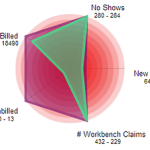
Do you worry about insurance claims payment delays? Lack of control over your chiropractic claims process causes inconsistent cash flow for your practice. If you cannot track and predict your cash flow easily you will have a hard time making your business profitable. You might even drive away patients when you are stressed out, which further hinders the growth of your chiropractic clinic. Ultimately, you cannot achieve any long-term profitability without sufficient growth. Since seeing patients is your priority, you can’t make time to micromanage each chiropractic billing aspect. Addressing the large amount of failing or rejected claims is virtually impossible with limited resources. Nevertheless, you need to follow up on your chiropractic claims to avoid reduced cash flow. Inconsistent and ineffective chiropractic billing performance can have many culprits including incompetent or untrained staff. But no one can adequately keep track and follow up on all underpaid and denied claims without effective chiropractic software. Not correcting these claims causes payment delays and can increase the percentage of your AR past 120 days. That’s why you need to track your active claims backlog and evaluate your chiropractic billing performance. Managing a chiropractic office is a balancing act of multiple Key Performance Indicators (KPIs), though. It can be challenging to prioritize tasks as many chiropractors tackle easy problems first before they focus on more complex matters. You need to keep your eyes on the big picture if you want to improve your claims workflow management and chiropractic billing performance. To accomplish this you need a centralized organization of tasks and performance. It is important to choose the right chiropractic software functionality. You should be able to look at multiple aspects of your practice at once, just like the snapshot Genesis’ Practice Health Monitor (a.k.a Radar) provides. To improve teamwork every member of your staff can also see this Radar chart on Genesis’ Home page every time they log on. You don’t need to waste time on compiling your practice stats, including claims status since data collection is automated. Furthermore, you and your staff can monitor trends to detect any problem areas before they cripple your practice performance. You can track your practice performance over time and measure any improvements with Genesis’ radar. But first you need to customize your workflow KPIs. Your Practice Success Coach then configures your radar to help you reach your goals.
Chiropractic EHR | How much are No Shows costing your clinic?

Do you know how patient No Shows (NS) impact your chiropractic clinic? When patients do not make their appointments and they leave it up to you to contact them to reschedule it tells you a lot. It shows they do not value the adjustment and they are not making the connection between making all of their visits on time and the improvement in their function or health. It is a BIG warning sign that they are an attrition risk. Your time to save them is running out. At the same time the bottom line of your practice suffers due to decreased revenue and wasted time. Follow up on no shows is mission critical. If a patient stops treatment you might have to return any payments received which further reduces your practice’s cash flow. Not to mention that you won’t be getting any referrals from patients who don’t get better. As a result, they must be rescheduled with a sense of urgency. They need to your help to reset their goals, expectations, action plan. You have to help them too take responsibility for their role in their own health. It can save their life, give you a great sense of purpose, and be the most profitable conversation you can have in your business. It is important to know exactly how much income your clinic is losing due to No Shows so that you can measure your improvement. If you replace the assumptions below with your own numbers you can calculate your estimated No Shows loss per month, just like in the following example. Assumptions: The average payment for one Patient visit is $30.00 Calculations: Daily CostTwo no shows per day cost you $60.00 per day:2 x $30 = $60 Weekly CostTen no shows per week cost you $300:10 x $30 = $300 => Annual Cost In a year your loss of income is $15,600: 52 x $300 = $15,600 The good news is that you can reduce this lost income by using Genesis’ scheduling and ticket system to reschedule all No Show patients. Plus, you can view No Show trends at a glance on your Radar Chart. When you make sure all of your patients have another appointment scheduled, relationships improve and your practice grows along with your profits.
Control Claim Flow Visually Using Radar Software
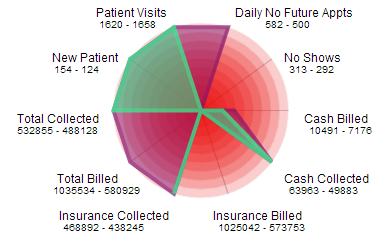
Do you worry about insurance claims payment delays? Peace of mind is hard to come by when you don’t have control over your chiropractic claims process since this affects your practice cash flow negatively. If you cannot track and predict your cash flow easily your business is doomed to die. To make matters worse, you drive away patients when you are stressed out, which further hinders the growth of your chiropractic clinic. Ultimately, you cannot achieve any long-term profitability without sufficient growth. Since seeing patients is your priority, you can’t make time to micromanage each chiropractic billing aspect. Addressing the large amount of failing or rejected claims is virtually impossible with limited resources. Nevertheless, you need to follow up on your chiropractic claims to avoid reduced cash flow for your practice. Inconsistent and ineffective chiropractic billing performance can have many culprits including incompetent or untrained staff. But no one can adequately keep track and follow up on all underpaid and denied claims without effective chiropractic software. However, not correcting these claims can affect the entire practice negatively since they will be forgotten and as such increase the percentage of your AR past 120 days. In fact, you need to track your active claims backlog in order to evaluate your chiropractic billing performance and AR. Managing a chiropractic office is a balancing act of multiple Key Performance Indicators (KPIs), though. It can be challenging to prioritize tasks as many chiropractors tackle easy problems first before they focus on more important matters. Instead of just putting out random fires you need to see the big picture consistently if you want to improve your claims workflow management and chiropractic billing performance. In order to do that you need a centralized organization of tasks and performance. Hence, it is vital to choose the right chiropractic software functionality. Naturally, your practice has a unique workflow that can only be supported by configurable and customizable chiropractic software. Yet, learning new chiropractic software can be a hassle many chiropractors would rather avoid. For that reason you should focus on ease of use for workflow management when evaluating possible chiropractic software solutions for your office. Moreover, all data should be displayed in an easy to digest way so you can complete a meaningful analysis on your own without wading through long and boring text reports. You should be able to look at multiple aspects of your practice at once, just like the snapshot Genesis’ Practice Health Monitor (a.k.a Radar) provides. To improve teamwork every member of your staff can also see this Radar chart on Genesis’ Home page every time they log on. You don’t need to waste time on compiling your practice stats, including claims status since data collection is automated. Furthermore, you and your staff can monitor trends to detect any problem areas before they cripple your practice performance. In order to track your practice performance over time and measure any improvements, you only need to customize your workflow KPIs. Genesis’ daily radar analysis and consistent follow ups in form of monthly Health Checks with your Coach further provide support to help you reach your goals.
Is Your Chiropractic Software A Piece of Junk?

The word “Guarantee” is good, but No Regret is what you really want. I bought an iPad about three months ago and it is obsolete today. Sound familiar? Imagine if it cost $15,000? What if your software is obsolete in 3 years? Don’t believe that can happen? Things are changing faster than you think. I’ll come back to this. I am about to show you the how “owning” chiropractic software is not only a misnomer (Sales ploy used to make you “feel” good about spending your hard earned money) but one of the riskiest investments you can make in your practice. While companies promise you it protects you, it actually leaves you and your practice vulnerable. I will debunk the big fat myth that it costs your less money to “own” a chiropractic software, (which you actually never do), and show you how you can guarantee that you will not regret your software decision. We will discuss the REAL cost of the two main types of systems and pricing models. Web bases systems vs. Client Server (The one they say you “own”) Data Protection – The biggest lie told today is that somehow your data is safer in your office. It is it better to backup your data offsite regardless. It is useless without the software anyway. Just ask doctors who were in the path of Hurricane Sandy which is better. In the end I will show you how web based systems like, Genesis Chiropractic Software and Billing, pay for themselves and possibly even put some money back in your pocket. Price Comparison SaaS (Software as a Service) – Is a pricing model. Today it is usually reserved for software that is web based. In the past other chiropractic software used this model and charged upwards of $700 per month. They got away with it for years and eventually switched to the “purchase” model. SaaS charges a smaller monthly fee with little to no upfront fees. Let’s do the simple math Some systems on the market are as cheap as $12,000. Compare that to the cost of a SaaS product at $250 per month. $12,000/$250 = 48 month. In other words, at $250/month it will take 4 years before you pay the same amount! Read on and you will see how you can go from 48 months to 60, 100 or unlimited months. Meaning it will never cost you more than $12,000 to use a system like Genesis. But then I own it after 4 years! Really? Do you own the code? Can you tell the company what to build next? What if they go out of business two years later? More importantly REMEMBER the iPad… When you “purchase” you are not buying software, you are buying a license to use the chiropractic software. The company that supports that chiropractic software could be gone tomorrow. Big Difference. If that happens your license is useless. Unless you want to buy the code. I promise you, it isn’t cheap. When you “purchase” you still need to pay for upgrades. $50 per month. Subtract $50 from the $250 that SaaS offers since upgrades are included in the SaaS model (that’s the service part of Saas). With that factored in 4 years becomes 5 Years Remember the iPad. I know what you are thinking, I get upgrades. True you get upgrades. You can buy new computers and they will send you the upgrades so what’s the big deal. Here it is. There are actually 3 things you need to be concerned about. The hardware – That is the actual computer. Those will need to be replaced on an ongoing basis regardless of what type of system you buy. The software code – This is what words are in the code, if you will. In other words you can add new paragraphs to a document in the English language. With software more words equals updates. The system adds function, features etc. That is great. The language – The breath of options is limited to the language the software is built in. When you buy a software you buy it knowing full well that the language your system will be written in 5 years from now has NO Chance of being upgraded. The language is the language. The reason Google is so successful is due, in part, to the fact they are constantly evolving the language they use. It’s not just the words. The capabilities are increasing because the language is changing. Since they are also web based they can upgrade their systems and you don’t see they difference. Just amazing new function. This is the same with your practice software. Software you buy will be limited in just a few years as web based systems language AND code rapidly change. Not so with client server systems. So you are paying a fixed fee because the functionality is fixed in time with today’s language. Clearing House Fees -Included with Genesis billing – $50/month with other systems – Now it takes 6 years to pay the equivalent of other systems. Network Maintenance – With web based systems, computers do not need to be networked together. Only connected to the web. Other systems require a server and network which will cost $1,000-$2,000 to set up. ….. Figure another $50 per month for upgrades to hardware, maintenance for the computer guy to fix things when they break down, and down time….. 8 years easy. Are you betting static software language is going to be as cutting edge in 8 years? Data Backup Service – $25/month 8.5 years (included with web based systems like Genesis.) Peace of mind – Infinite peace of mind. Genesis data center was in the path of hurricane Sandy and experience zero down time. Some clients who lost their office where able to be back up and running instantly with a wireless laptop or iPad. The didn’t lose any data. Others weren’t so lucky. Now what if they paid you? Why not? SaaS systems have it built into their price to have a referral fee. We pay
